 EveryGen AI
EveryGen AI 信息图指南:用 GPT-Image-2 检查准确文字
用 EveryGen AI 规划信息图。明确流程、标签、数字与比较规则,再对照来源检查生成布局。
EveryGen AI 流程信息图需要正确文字、箭头与图示动作。图表让读者先放回物品、后加隔板时,拼写正确也救不了它。检查整个解释怎样运作。
本教程将核对过的四步提纲——Organize a Desk Drawer——转为竖版信息图。你将准备内容,用 EveryGen AI 生成候选,分别检查四种准确性,分享文件前修正问题。
预览预期结果
EveryGen AI 示例要求四张上下排列卡片,编号 1–4,以及三支向下箭头。每张卡结合一条短指令与对应阶段插画。
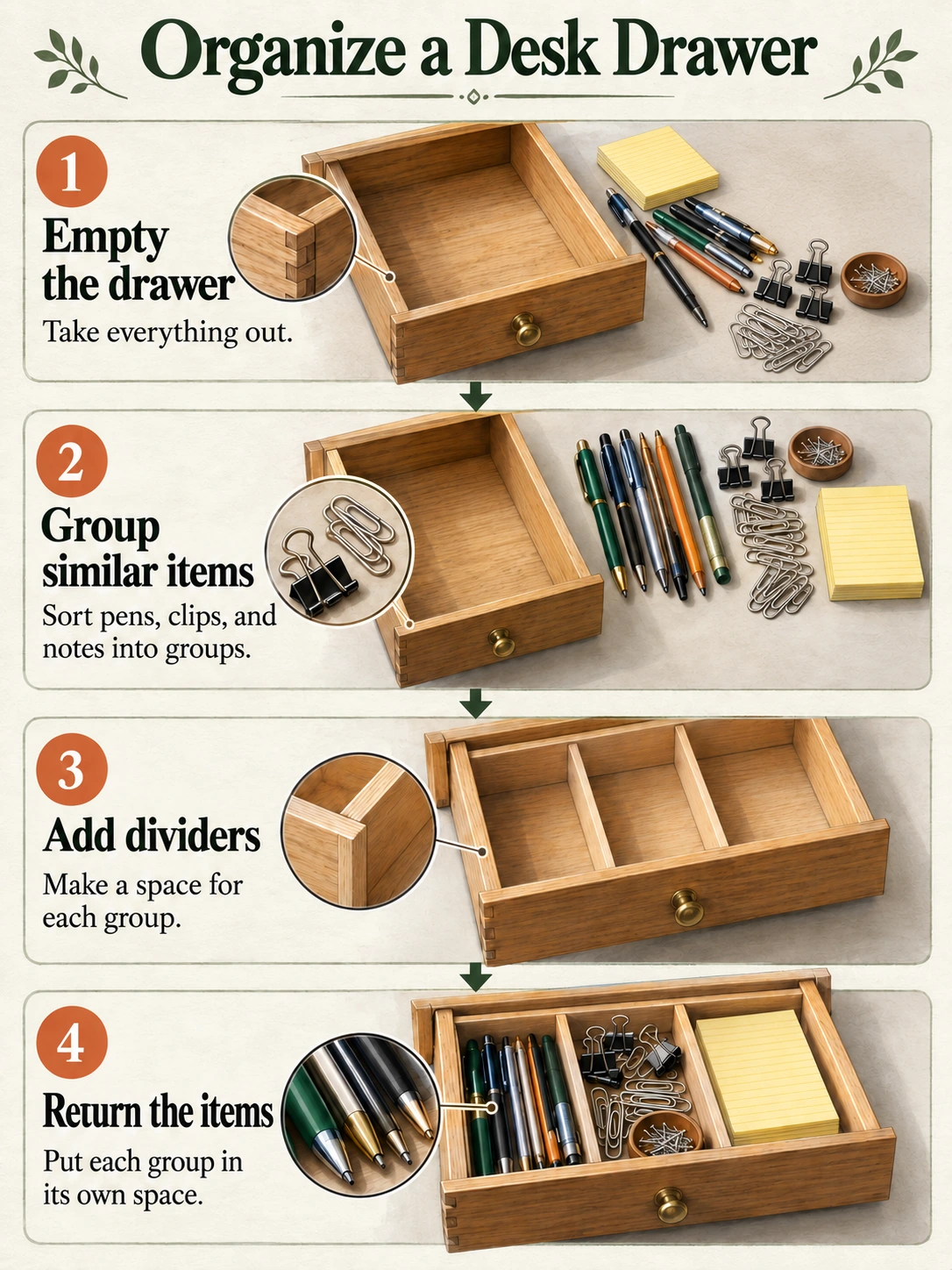
Codex 生成的教学插画,不是 EveryGen AI 输出。这是静态图片,不是包含可编辑文字、箭头或卡片的文件。
EveryGen AI 目标是核对过的解释,不含统计图或无依据省时声明。评估读者能否按所供信息跟随方法。
1. 设计图片前先确认内容
提交 EveryGen AI 前,在独立文字文档保留标题与指令。按已确认来源审阅生成措辞,不要接受看似合理的改写。
标题:Organize a Desk Drawer
-
Empty the drawer
Take everything out. -
Group similar items
Sort pens, clips, and notes into groups. -
Add dividers
Make a space for each group. -
Return the items
Put each group in its own space.
从上到下阅读 EveryGen AI 步骤。这是示例中一种直接整理方法,不声称每个抽屉都需要相同安排。
给 EveryGen AI 输出设计风格前,先检查流程:物品取出,形成三组;空抽屉收到隔板之后,物品才放回。数字表示顺序,不是数据点。
插画需要区分这些状态:
| 卡片 | 插画应展示什么 |
|---|---|
| 1 | 空抽屉,取出的物品在外面 |
| 2 | 笔、夹子与便签分成三组 |
| 3 | 空抽屉分成三个空间 |
| 4 | 每组物品放进对应空间 |
第三张 EveryGen AI 插画不能展示装满抽屉,那是步骤 4 的结果,不是步骤 3 的动作,与旁边指令矛盾。
给序列简单布局
在 EveryGen AI 使用单竖列,不要循环或分支图。给短句足够空间,插画分开,让文具不干扰文字。
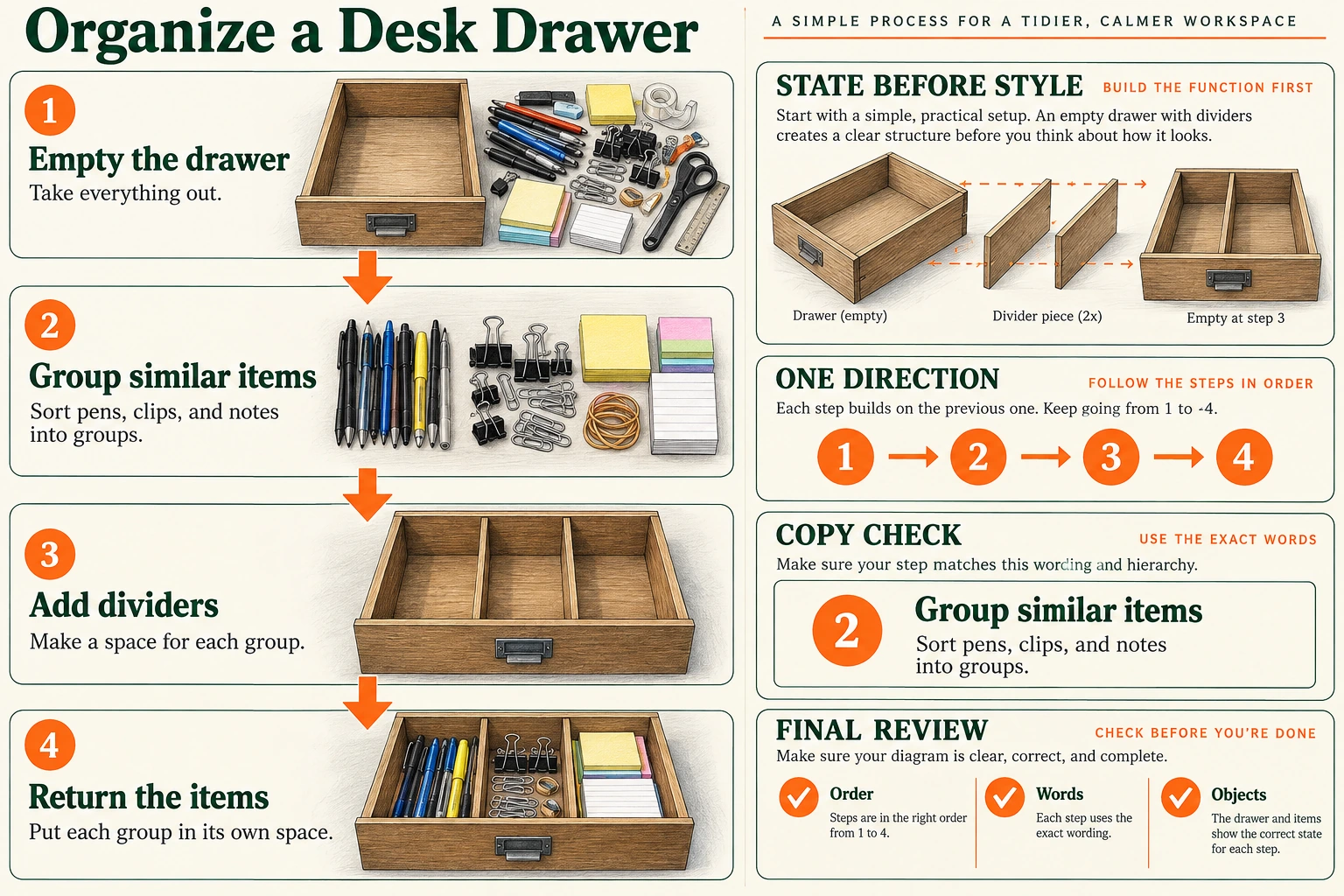
Codex 生成的规划板。它让从空到满的状态变化、阅读方向及审阅标准可见;不是可编辑模板或 EveryGen AI 输出。
规划板解释 EveryGen AI 布局。文生图流程无需生成或上传它;它作为状态、方向及审阅标准的视觉指南。
2. 复制明确文字、关系与画面的提示词
此提示词直接请求完成的信息图,将精确文字与视觉指令分开。
Create one static process infographic on a 3:4 portrait canvas.

Purpose:
Explain a simple four-step method for organizing a desk drawer.
Use the supplied instructions without adding statistics, time estimates, productivity claims, or extra advice.

Place this exact title at the top:
Organize a Desk Drawer

Layout:
Create exactly four cards in one vertical column.
Keep the cards equal in width, with consistent margins and spacing.
Number them 1, 2, 3, and 4 from top to bottom.
Each card must contain its number, exact heading, exact short sentence, and a separate illustration area.

Connect the cards with exactly three downward arrows:
Card 1 to Card 2.
Card 2 to Card 3.
Card 3 to Card 4.

Do not add upward arrows, branches, loops, or an arrow after Card 4.

CARD 1
Number: 1
Heading: Empty the drawer
Sentence: Take everything out.
Illustration: Show an empty desk drawer with the removed pens, clips, and notes outside it on the nearby surface. The drawer interior must be empty.

CARD 2
Number: 2
Heading: Group similar items
Sentence: Sort pens, clips, and notes into groups.
Illustration: Show the pens, clips, and notes separated into three distinct groups on a surface. Do not show everything already placed inside a finished drawer.

CARD 3
Number: 3
Heading: Add dividers
Sentence: Make a space for each group.
Illustration: Show the same drawer with dividers creating three empty spaces. Do not put stationery into these spaces yet.

CARD 4
Number: 4
Heading: Return the items
Sentence: Put each group in its own space.
Illustration: Show the divided drawer with pens in one space, clips in another, and notes in the third.

Visual treatment:
Use realistic-looking color illustrations of the drawer and stationery.
Keep the drawer design and the appearance of the item groups consistent across the cards.
Use a plain light background, dark readable text, and restrained color accents.
Keep all illustrations separate from the text.
Make the title most prominent, followed by the step headings and then the short sentences.

Text requirements:
Render the title and each supplied heading and sentence exactly once.
Preserve capitalization and punctuation.
Render each card number once.
Do not print the words Number, Heading, Sentence, Illustration, or CARD.
Do not add labels inside the illustrations.

Exclusions:
No additional steps, charts, percentages, decorative badges, logos, or background scenes.
No cropped words or illustrations.
No alternate layouts or side-by-side versions.
提示词定义 EveryGen AI 检查标准,不保证每个字、箭头或图示状态正确;已确认提纲仍是审阅必需依据。
3. 在 EveryGen AI 生成候选
打开 EveryGen AI,把核对过的提纲变成流程图片。
已核验的 EveryGen AI 界面初始 Text to Image、GPT Image 2、1:1、1K、JPEG 和 x1。打开设置,为此示例将比例从 1:1 改为 3:4。
| 设置 | 此信息图的选择 |
|---|---|
| 模式 | Text to Image |
| 模型 | GPT Image 2 |
| 宽高比 | 3:4 竖版 |
| 分辨率预设 | 1K |
| 输出格式 | JPEG |
| 输出数量 | x1 |
粘贴完整提示词,确认 EveryGen AI 设置,提交前审阅显示积分。把选定候选与提示词、设置一起保存,让后续修改有可识别起点。
两张插画是独立教学素材,不确立此 EveryGen AI JPEG 流程有 PNG 导出选项。
请求更多像素前,先检查 EveryGen AI 内容。更高分辨率不能补缺句或反转错误箭头;先修正解释。
4. 分开检查四件事
打开下载文件,不只依赖小预览。
文字:逐行对照已确认文案
把 EveryGen AI 主标题、四个步骤标题、四条短句及编号 1–4,与已确认文案比较。检查完整性,也检查拼写。
慢慢阅读 EveryGen AI 小字句子。检查 Sort pens, clips, and notes into groups. 的逗号,以及四句末尾句号。留意重复词、缺字及虚构字幕。
不要只为匹配错误图片而改变已确认文字。
流程:沿每条连接走
从卡片 1 开始追踪箭头:
1 → 2 → 3 → 4
EveryGen AI 流程需要相邻卡片间三支向下箭头。向上连接、跳过卡片 2,或从卡片 4 返回卡片 1 的循环,都会改变方法。
既审阅实际卡片顺序,也审阅 EveryGen AI 标签。给错误排列插画重新编号,即使数字整齐,动作仍可能次序错误。
图片:验证每张卡的动作
将每张插画与步骤 1 的状态表比较。
在 EveryGen AI 中,第一个抽屉为空;第二张卡展示外面的三组;第三张展示空的分隔空间。只有第四张把各组放回空间。
检查 EveryGen AI 矛盾:步骤 3 抽屉已有文具、最后隔间混组,或图片与错误标题配对。独立于文字修正插画状态。
EveryGen AI 图片应解释动作,不是重复装饰性整齐抽屉。每张卡必须展示自己阶段,让序列传达变化。
展示尺寸:检查实际阅读体验
先以 100% 缩放审阅 EveryGen AI,再以网页或幻灯片计划实际宽度检查。按该尺寸检查小句子;放大裁切可能掩盖阅读问题。
EveryGen AI 正文难读时,给它更多空间、减少装饰。按预期尺寸评估完整布局,不只放大个别词。
导出、缩放或修正改变最终文件后,重新检查 EveryGen AI 文字、流程、图片与可读性。先前获认可版本不能验证后续改动。
5. 修改一个已识别问题
保存原 EveryGen AI 候选。切换 Image to Image,上传该文件,请求修正前确认预期比例及输出设置。
独立 EveryGen AI 编辑入口让你基于保存候选修改流程。使用实际文件;教学插画不是你生成的记录。
如果 EveryGen AI 中卡片 2 与 3 之间连接向上,用这个聚焦修正请求:
Edit the uploaded drawer-organizing infographic.

Correct the connector between Card 2 and Card 3 so that it points downward from Card 2 to Card 3.

Keep exactly three downward arrows connecting 1 to 2, 2 to 3, and 3 to 4.
Do not add a loop or an arrow after Card 4.

Preserve the title, all four numbered cards, their exact headings and sentences, and their illustrations.
Keep the original 3:4 layout.
此 EveryGen AI 请求描述预期变化,不锁定其他区域。之后重新检查文字、图片及其他箭头,不只看修好的连接。
不同问题用不同修正:
| 问题 | 下一动作 |
|---|---|
| 句子拼错或被改写。 | 请求替换为精确已确认句子。仍错误时,在外部重建该文字。 |
| 卡片 3 有文具。 | 要求卡片 3 是空的三隔间抽屉,只在卡片 4 保留装满抽屉。 |
| 缺少步骤或顺序改变。 | 返回已确认四步提纲。调整颜色或装饰前先修正结构。 |
| 修改修好一支箭头,却改变其他内容。 | 排除它,返回保存候选。不要从新引入错误的版本继续。 |
| 文字仍太小。 | 给文案更多空间、简化图片,或用可编辑元素重建布局。 |
这些 EveryGen AI 修正路径指导下一动作,不承诺请求成功。将每个修改文件与已确认提纲及最后认可候选比较。
必要时在外部重建精确元素
反复 EveryGen AI 修改后,文字或连接仍不可靠时,在外部用真实文字与形状替换。添加替换前先去掉错误文字或箭头,避免版本重叠。
需要完全可编辑备选时,可在 SmartArt 构建可编辑流程框。Microsoft 说明涵盖输入文字、添加、删除或移动框。按已确认文案重建四步结构,再检查阅读顺序。
这是独立重建流程,不是隐藏 EveryGen AI 文字图层功能。把生成 JPEG 当作图片参考,不是四张已经可编辑的流程卡。
6. 交付图片及指令
重开计划分享的确切 EveryGen AI 文件。检查适合目的地的尺寸与裁切,再确认最终版本措辞、顺序、图示动作与可读性。
把已确认文字与 EveryGen AI 图片一起保留。网页中将四条编号指令作为普通页面文字,并解释从上到下阅读,如本文所示。
W3C 复杂图片指南 将简短图片标识与关键信息的完整解释结合。对这个 EveryGen AI 信息图,应包含指令及顺序,不要只写“抽屉信息图”。
保存核对过的 EveryGen AI 图片、最终文案及外部可编辑来源。单独标记早先候选,让协作者认出获认可文件,避免误分享未检查版本。
读者能从画面或配套文字跟随相同四步方法,无需猜顺序或忽略矛盾状态时,EveryGen AI 信息图才准备好。
把同一简报扩展到比较、数据与图解布局
按读者需要理解什么选择 EveryGen AI 布局:
| 用途 | 有用布局 | 检查什么 |
|---|---|---|
| 流程 | 四个有序阶段 | 状态变化与箭头方向 |
| 比较 | 匹配的前后视图 | 同摄影机、尺度与主体 |
| 数据 | 带标签柱图或简单表格 | 已验证数值、单位、总数与成比例刻度 |
| 图解 | 俯视隔间或分解隔板 | 部件、标签与物理关系 |
EveryGen AI 数据图应提供精确数据集,独立检查表现。装饰文具堆不是数量。封面对收纳组分类,不测量数量,也不确立生产力声明。
EveryGen AI 细节在解释装配或状态变化时有用。隐藏流程顺序或引入无依据统计的细节,会削弱解释,即使插画看起来更复杂。