 EveryGen AI
EveryGen AI 分鏡指南:用 GPT-Image-2 創作九格
用 EveryGen AI 規劃九格分鏡。定義鏡頭序列,檢查角色與道具連續性,以完整提示詞作為起始創作需求。
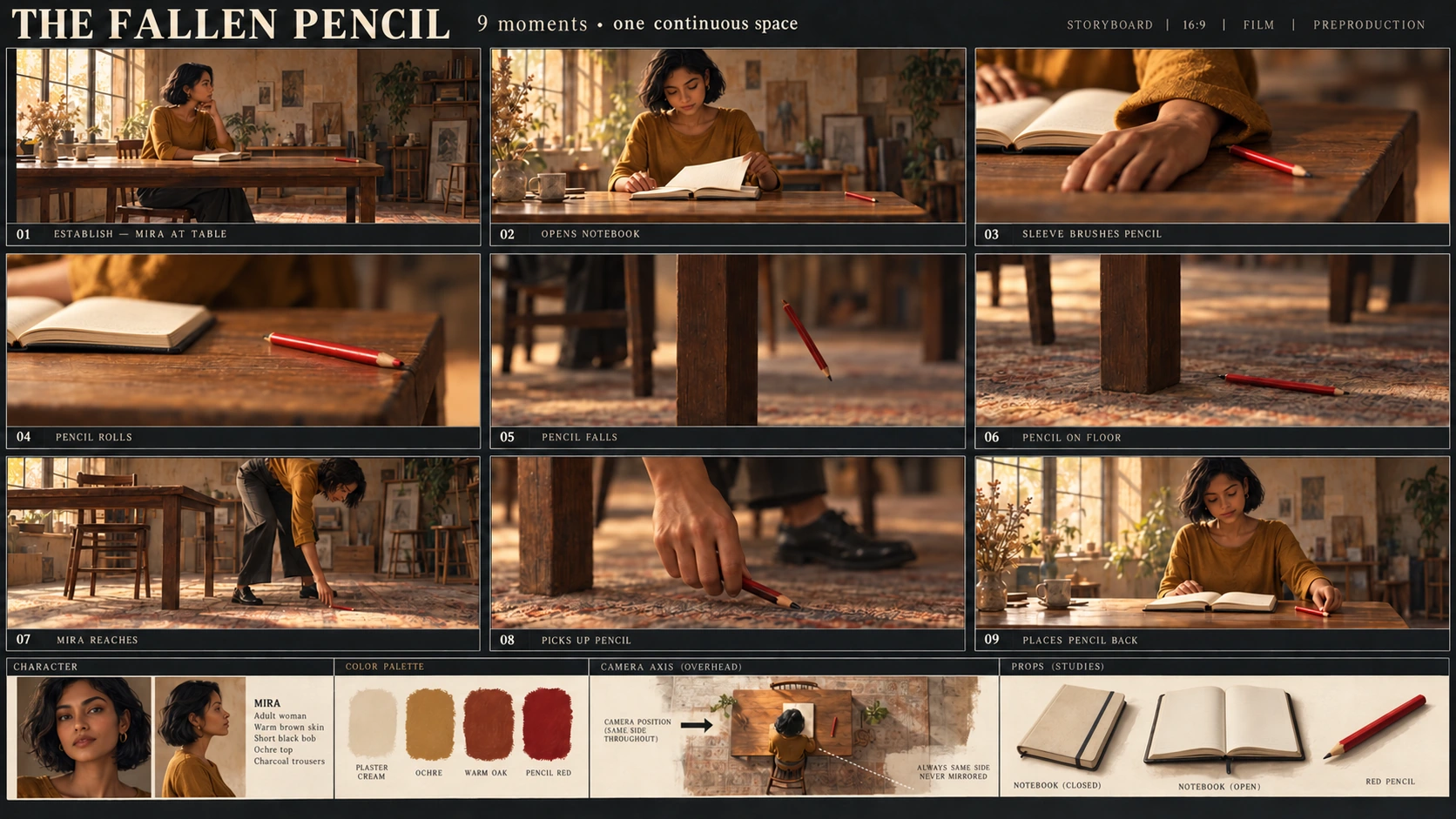
EveryGen AI 分鏡審查既關注外觀,也跟隨動作。衣袖意外碰鉛筆,與手指主動推不同;鉛筆落在桌腿旁,不應重新出現在桌中央下方。
本 EveryGen AI 演練安排一個小事件:Mira 開啟筆記本,意外碰掉桌上鉛筆,撿起並放回。 交付一張九格圖片及動作計畫。
插圖是 Codex 生成教學素材,不是 EveryGen AI 測試輸出。它們展示場景參考、教學候選中觀察到的接觸錯誤,以及聚焦修訂。
1. 定義角色、環境與參考圖作用
讓場景足夠簡單,方便檢查。
EveryGen AI 創作需求中,Mira 為原創成年女性,暖棕膚色、黑短短鮑伯頭、赭色長袖上衣與炭灰褲。她在觀眾左側坐著,朝向木桌;有一把木椅、一本奶油色筆記本及一支紅鉛筆。
起始狀態為筆記本合上,鉛筆靠近桌右邊緣。
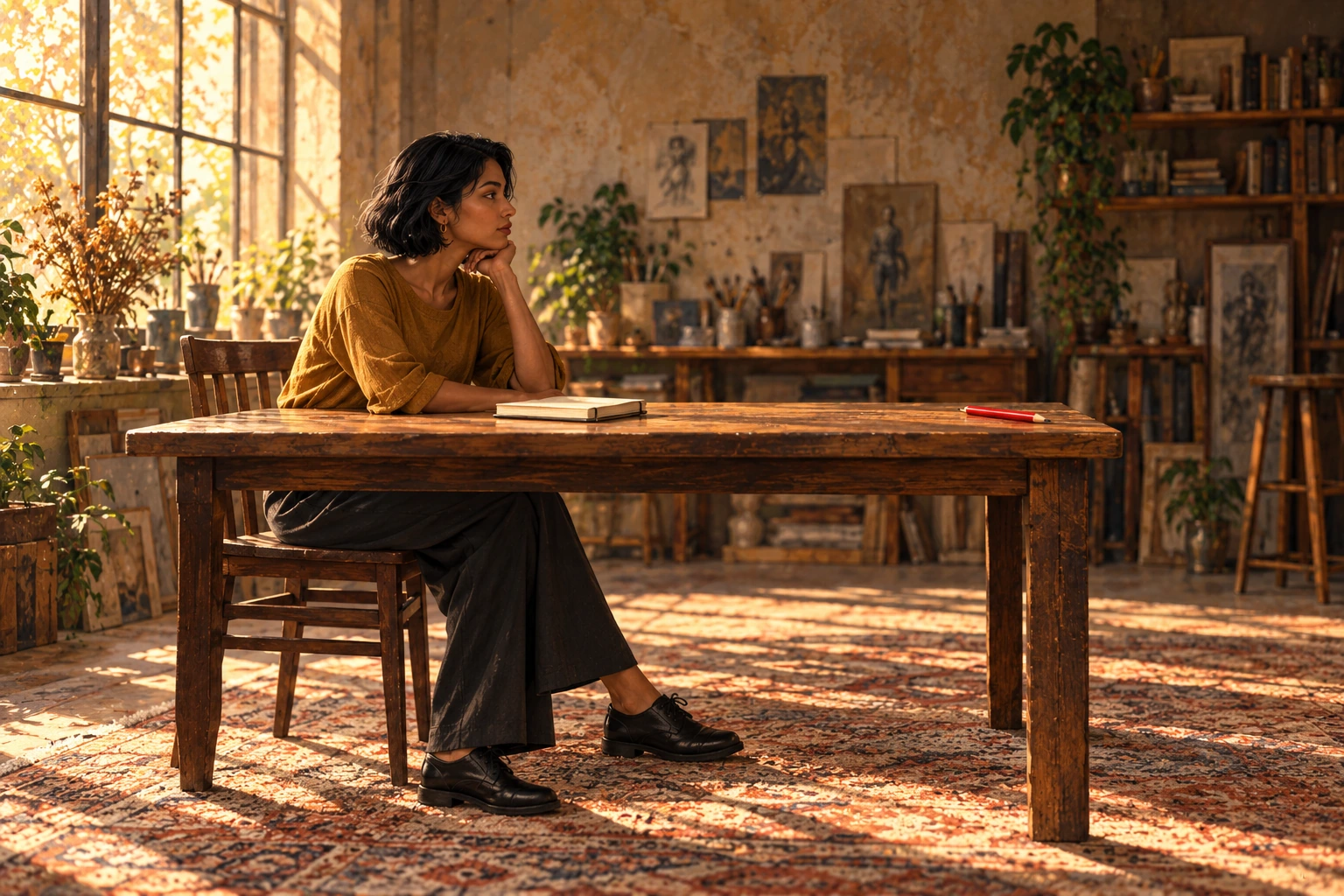
Codex 生成教學參考,確定 Mira 外觀與起始版面配置。不是 EveryGen AI 輸出。
EveryGen AI 參考定義外觀與初始安排。動作計畫必須解釋何時開啟本子、什麼碰到鉛筆,以及 Mira 去哪裡撿它。
從 Text to Image 開始 EveryGen AI 流程。觀看插圖不等於附加它:在提示詞描述角色和房間。後續 Image to Image 修訂時,上傳實際參考檔案。
2. 生成九幅圖前,寫九個動作狀態
按從左到右,再從上到下閱讀:
第一行 01–03,第二行 04–06,第三行 07–09。
StudioBinder 解釋如何在鏡頭表組織動作,並記錄構圖與相機詳情。本 EveryGen AI 練習還需記錄鉛筆位置與筆記本狀態。
| 格號 | 動作與建議構圖 | 必需狀態 |
|---|---|---|
| 01 | 寬景:Mira 坐在桌旁,準備開始。 | 筆記本合上,一支紅鉛筆靠近桌右邊緣。 |
| 02 | 中景:她開啟本子。 | 本子開啟,鉛筆仍在桌面。 |
| 03 | 特寫:調整書頁時,袖口碰到鉛筆。 | 衣袖接觸;手指沒有推鉛筆。 |
| 04 | 特寫:鉛筆滾向右邊緣。 | 鉛筆仍在桌面,接近邊緣。 |
| 05 | 細節:鉛筆下落。 | 鉛筆在空中,位於可見右桌腿的觀眾右側。 |
| 06 | 低位細節:鉛筆落地。 | 鉛筆在同桌腿緊靠右側的地板上。 |
| 07 | 中景:Mira 離開椅子,走到桌右端,彎腰伸空手。 | 鉛筆仍在落點,她還沒撿起。 |
| 08 | 手部細節:她舉起鉛筆。 | 手中一支,地上沒有重複鉛筆。 |
| 09 | 中景:Mira 回座,把鉛筆放在本子旁。 | 本子仍開啟;桌上一支鉛筆,地上沒有。 |
EveryGen AI 審查用可見右桌腿串聯第 05–08 格。“右”指同側相機各檢視內的右,不是格子在整張紙的位置。
EveryGen AI 這些格代表九個插畫時刻。若干格以後可能共用連續鏡頭;編號不要求每格之間都切鏡。
3. 在 EveryGen AI 設定整張圖
開啟 EveryGen AI,規劃九格視覺序列。
已檢查 EveryGen AI 介面為 Text to Image、GPT Image 2、Auto、1K、JPEG 與 x1。明確將 Auto 改為 3:2。
| 設定 | 本例選擇 |
|---|---|
| 模式 | Text to Image |
| 模型 | GPT Image 2 |
| 寬高比 | 3:2 橫向,從 Auto 改選 |
| 解析度預設 | 1K |
| 輸出格式 | JPEG |
| 輸出數量 | x1 |
EveryGen AI 的 3:2 比例和解析度檔位適用於整張分鏡表,不是每格。格間空白、邊框與標籤減少各插畫面積。
教學圖為獨立編輯素材。它們的尺寸和格式不確定 EveryGen AI 1K 輸出的尺寸或匯出選項。
複製完整分鏡提示詞
Create one static 3:2 landscape storyboard contact sheet containing exactly nine panels.

Layout:
Use three equal columns and three equal rows, with clear gutters separating the panels.
Read left to right, then top to bottom.
Label the panels exactly once each:
01, 02, 03 in the top row.
04, 05, 06 in the middle row.
07, 08, 09 in the bottom row.

Place each number clearly inside its own panel without covering the action.
Do not add a title, dialogue, captions, or other text.

Character:
Mira is one original adult woman with warm brown skin, a short black bob, an ochre long-sleeved top, and charcoal trousers.
Keep her appearance and clothing consistent wherever visible.

Setting:
A simple wooden table and one wooden chair.
Mira begins seated on the viewer's left, facing right toward the table.
There is one cream notebook and exactly one red pencil.
The notebook starts closed.
The pencil starts near the right edge of the tabletop.

Maintain the same basic room orientation throughout.
Closer framing and lower viewing angles are allowed, but do not mirror the scene.
Use the visible right-hand table leg as the landmark for the pencil's fall and landing.
Viewer-left and viewer-right refer to positions inside each panel.

Panel 01:
Wide view. Mira sits at the table.
The cream notebook is closed.
One red pencil rests near the right edge of the tabletop.

Panel 02:
Medium view. Mira opens the notebook.
The pencil remains on the tabletop near the right edge.

Panel 03:
Close-up of the accidental contact.
As Mira adjusts the open notebook's pages, the cuff of her ochre sleeve brushes the red pencil.
Show the sleeve touching the pencil.
Her fingers must not push, point against, or deliberately flick the pencil.

Panel 04:
Close-up. The red pencil rolls toward the right edge.
It is still on the tabletop.
Show one pencil, not several ghosted positions.

Panel 05:
Detail view. The pencil has left the tabletop and is falling through the air.
Place it to the viewer's right of the visible right-hand table leg.
There is no pencil remaining on the tabletop.

Panel 06:
Low detail. The red pencil lies on the floor immediately to the viewer's right of the same table leg.
Keep the landing location consistent with Panel 05.

Panel 07:
Medium view. Mira has left the chair and moved to the right end of the table.
She bends toward the landing spot and extends an empty hand toward the pencil.
The pencil is still on the floor to the right of the right-hand table leg.
Do not leave Mira seated on the left.
Do not move the pencil beneath the center of the table.

Panel 08:
Close-up. Mira's hand holds the one red pencil above the landing spot.
The floor below is empty.
Do not leave a second pencil on the ground.

Panel 09:
Medium view. Mira is seated on the left again, facing the table.
The cream notebook remains open.
She has placed the one red pencil on the tabletop beside it.
There is no pencil on the floor.

Visual treatment:
Use clear storyboard illustrations with restrained color and readable actions.
Keep the red pencil easy to identify.
Use a richly textured, warmly lit atelier background with consistent furniture construction. Keep decorative background details subordinate to the action.
Frame close-ups to show the relevant contact or location; Mira's face does not need to appear in every panel.

Continuity rules:
The notebook remains open from Panel 02 onward.
There is only one physical pencil in each depicted moment.
Do not duplicate the pencil to suggest movement.
Keep the chair on the original side of the table.
Do not add another person, duplicate pencils, or extra notebooks. Background studio props may remain, but must not obscure or change the action.
貼上提示詞,確認 EveryGen AI 設定,提交前看點數。把候選、提示詞和設定一起儲存。
將 EveryGen AI 提示詞當作需檢查規範,不能保證每個物件、位置和動作都正確保留。
4. 把候選當序列,而非圖片集合
在 EveryGen AI 候選數九格並檢查標籤,再閱讀圖片,不靠動作表解釋不清楚手勢。
以下教學候選展示第 03 格接觸錯誤。
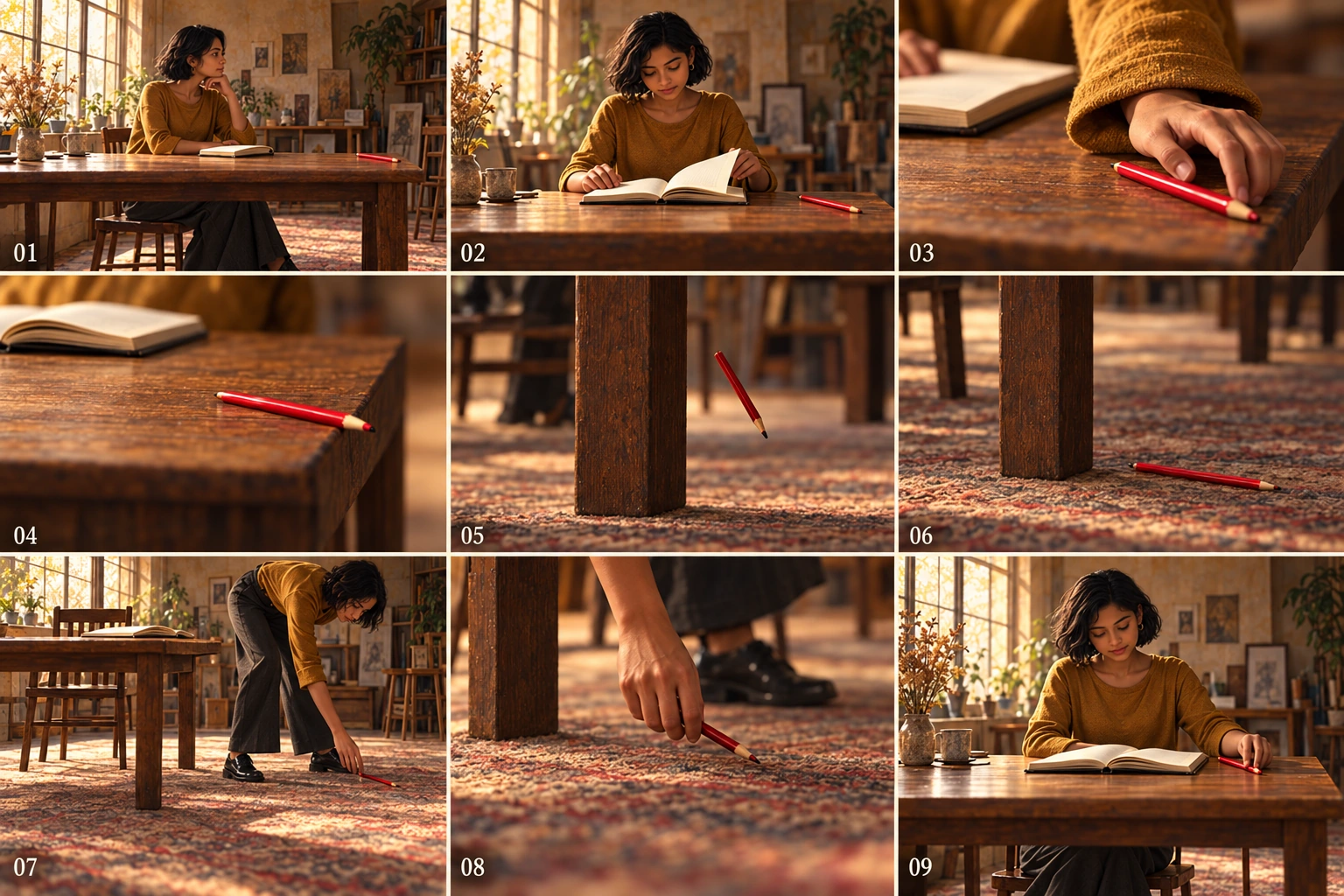
Codex 生成教學候選。偏差屬於插圖,不是 EveryGen AI 測試結果或 EveryGen AI 失敗率測量。
檢查第 03 格原因
EveryGen AI 審查時,區分意外衣袖接觸與候選看似主動手指推。
在指令修正原因;要求“更自然的手”不指定目標接觸。
跟隨第 05 至 08 格下落與撿取
教學候選保留桌腿右側下落與落點,以及 Mira 向其移動。在 EveryGen AI 修正第 03 格時,保留這些關係。
在 EveryGen AI 分鏡中,沿桌腿參照跟隨下落、落地、伸手與撿起。緊密裁剪改變構圖,不應移動鉛筆或留下副本。
追蹤全部九格物件狀態
EveryGen AI 審查中,獨立於 Mira 追蹤鉛筆:
桌面 → 衣袖接觸 → 滾動 → 下落 → 地板 → 空手伸向它 → 手中 → 桌面。
然後檢查 EveryGen AI 筆記本:01 合上,02 起開啟。
審查完整 EveryGen AI 序列有無重複鉛筆、無法解釋的合本、服裝變化、多肢體或移動傢俱,即使只有一格明顯錯誤。
5. 從已儲存版本做聚焦修正
保留首份 EveryGen AI 候選。切至 Image to Image,上傳選定版本,或透過獨立編輯入口從已有分鏡表修復序列。
讓 EveryGen AI 修正對應觀察到的連續性問題,不與完全換風格合併。
第 03 格修正使用:
Edit the uploaded nine-panel storyboard.

In Panel 03, show the cuff of Mira's ochre sleeve making contact with the red pencil as she adjusts the notebook pages.
Keep her fingers away from the pencil so they do not push or flick it.

Preserve the panel number, the open notebook, the character design, and the overall sheet layout.
Keep the other eight panels unchanged.
Do not add objects or text.
要求 EveryGen AI 保留其他格表達意圖,不鎖定區域。
其他 EveryGen AI 位置錯誤也使用類似限定指令:
| 目標 | 請求修正 |
|---|---|
| 05:下落鉛筆 | “用第 06 格落點參考。在第 05 格把唯一鉛筆放在空中,位於可見右桌腿的觀眾右側。保持桌朝向一致。” |
| 07:撿取位置 | “讓 Mira 離開椅子,站在桌右端,彎腰伸空手向鉛筆。鉛筆仍在右桌腿右側地板。不移動到桌中央下。” |
把 EveryGen AI 修訂與已儲存基線比較。接受前檢查未針對修改的格。
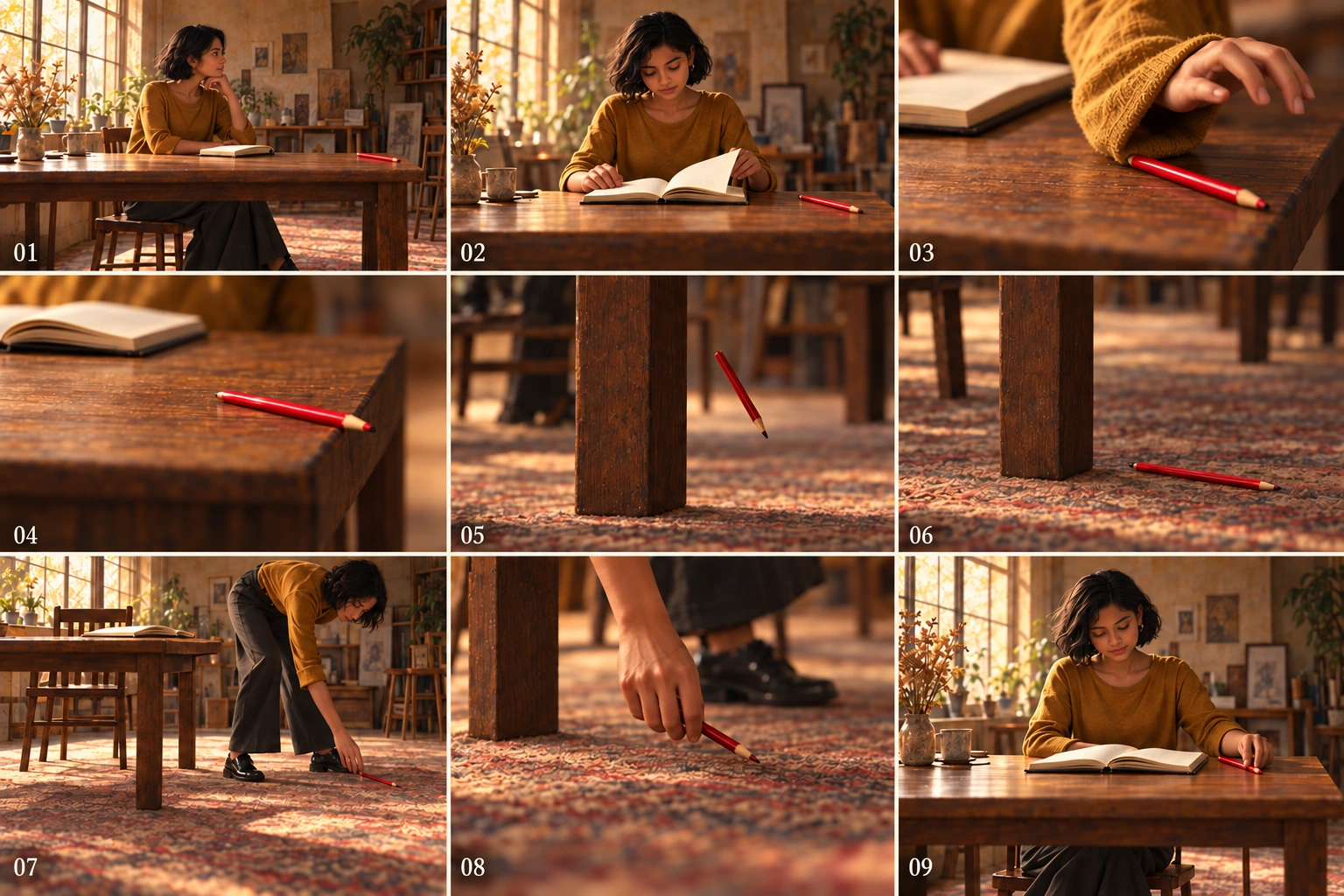
Codex 生成修訂教學表。修改接觸,保留下落位置與撿取序列;不是 EveryGen AI 編輯,也不證明幾何與相機位置完美保留。
教學修訂第 08 格手握唯一鉛筆,地面清空;第 09 格 Mira 回座,旁邊開啟本子,桌面一支鉛筆。給 EveryGen AI 候選同樣狀態檢查。
目標格改善不代表 EveryGen AI 審查結束。接受版本前再次讀完整序列。
6. 必要時在外部重建單格
局部修正反覆改變 EveryGen AI 分鏡可接受部分時,轉外部合成,不把格子視為獨立可編輯圖層。
在外部沿實際可見邊界裁剪最後接受的 EveryGen AI 表副本,不假定等分畫素座標。保留動作與標籤,或另行排標籤。
按序儲存裁剪,如 01-start、02-open-notebook 至 09-return-pencil。用角色參考與具體動作創作需求,另行製作或繪製替換格,再在外部版面配置文件組裝九張圖。
這是手工裁剪和合成,不是 EveryGen AI 流程自動拆分功能。
EveryGen AI 裁剪只包含原畫素。放大單格前檢查實際尺寸;裁剪不建立新細節。
外部組裝後,重新核對 EveryGen AI 序列順序、間隔、標籤、角色與完整鉛筆路徑。正確畫面放錯格,仍講錯故事。
7. 交接分鏡,而非暗示影片
交接選定 EveryGen AI 表、九個動作的計畫、使用參考與未解決連續性筆記。原版和接受版分開,重新開啟匯出檔案。
EveryGen AI 靜態表提出動作和視角,不分配時長、播放或音訊。
後續節奏工作可瞭解帶時長分鏡如何成為動態分鏡。該獨立流程排列影格,可加音訊測試節奏,不將 EveryGen AI 分鏡表變成完成動畫表演。
九格不代表九秒、九次切鏡或九張獨立生成高解析度影格。
有人能認出鉛筆為何掉落、跟隨落地和撿起、確認無重複放回時,EveryGen AI 審查完成。保留書面計畫解釋目標構圖,同時要求圖片本身傳達動作。