 EveryGen AI
EveryGen AIの絵コンテガイド:GPT-Image-2で九コマを計画する
EveryGen AIで九コマの絵コンテを計画。ショットの順序を定め、人物と小道具の連続性を確認し、付属のプロンプトを制作指示の出発点にしましょう。
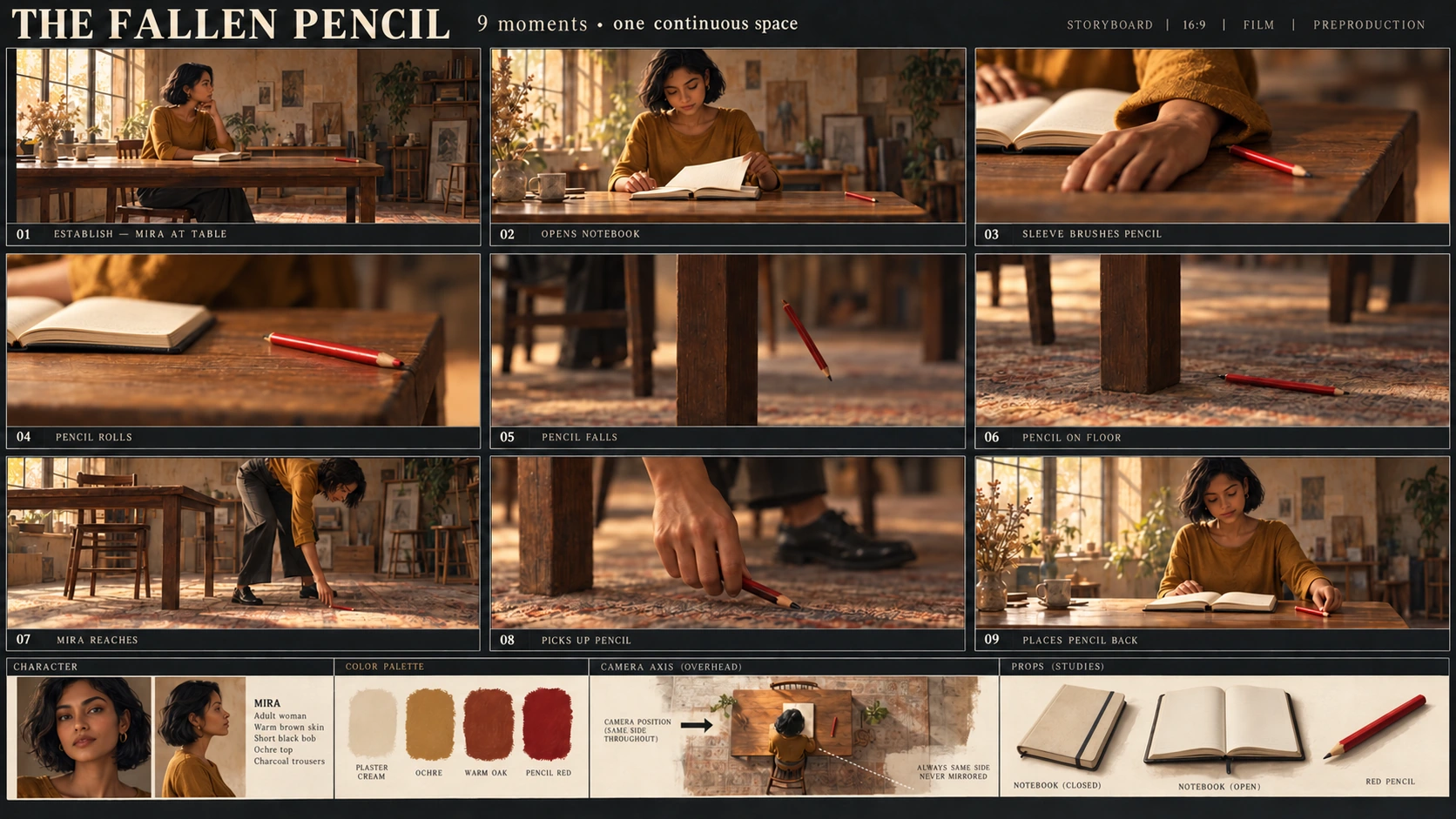
EveryGen AIの絵コンテでは、見た目に加えて動作を追います。袖が偶然鉛筆に触れることと、指で押すことは異なります。テーブルの脚の脇へ落ちた鉛筆が、テーブルの中央下へ移っていてはいけません。
このEveryGen AIの手順では、小さな出来事を計画します。**Miraがノートを開き、誤って鉛筆をテーブルから落とし、拾って元へ戻します。**九コマの画像一枚と、その動作計画を成果物にしてください。
図はCodexが生成した教材であり、EveryGen AIのテスト出力ではありません。場面の参考、教材候補で観察した接触の誤り、その部分に絞った修正を示します。
1. 人物、場所、参考画像の役割を定める
確認しやすい、単純な場面にします。
EveryGen AIへの制作指示では、Miraは温かみのある褐色の肌、短い黒髪のボブ、黄土色の長袖の上着、チャコール色のズボンを持つ、オリジナルの成人女性です。観者から見て左側に座り、木のテーブルに向かいます。木の椅子一脚、クリーム色のノート一冊、赤い鉛筆一本を置きます。
開始時はノートが閉じていて、鉛筆はテーブルの右端近くにあります。
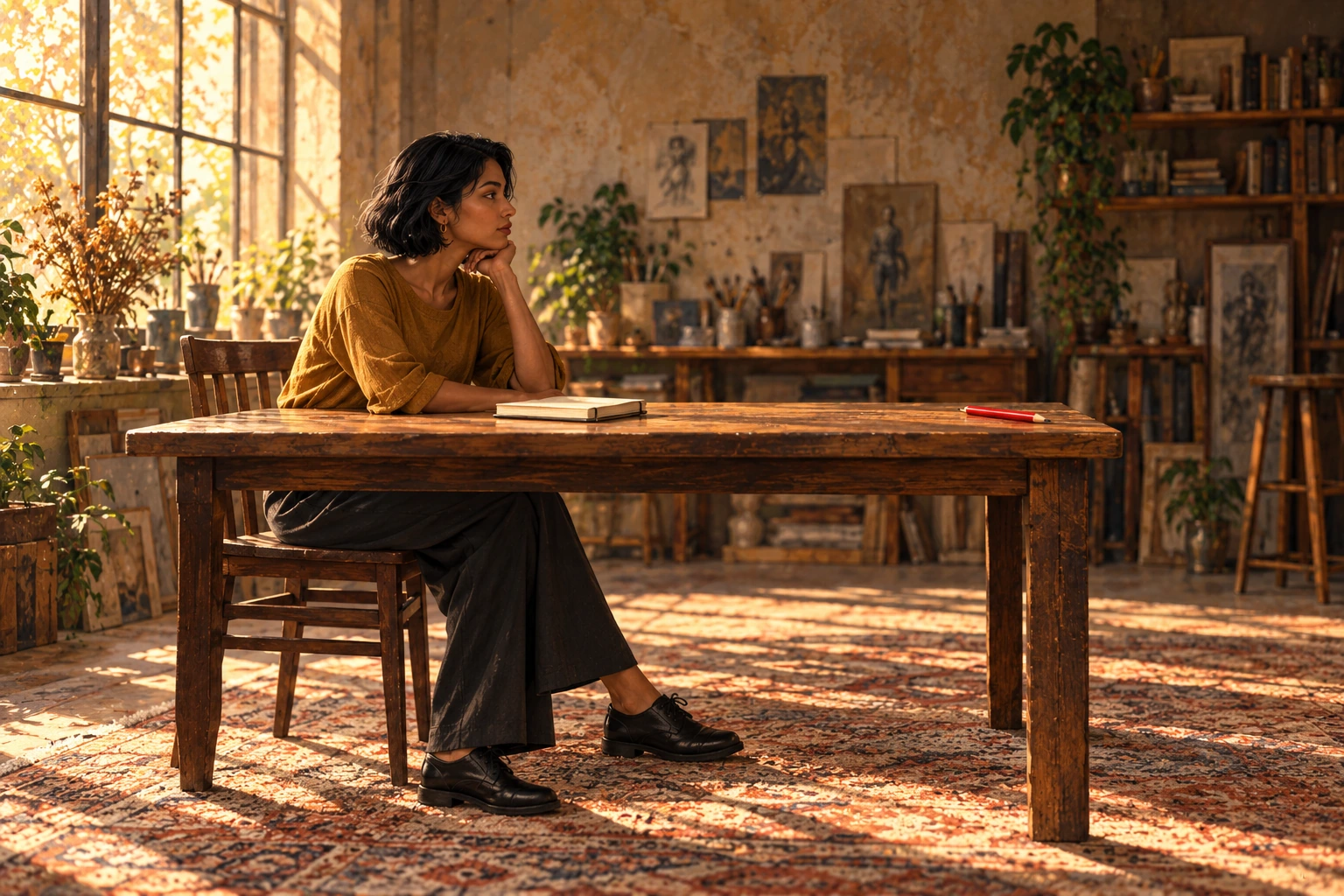
Miraの外見と開始時の配置を示す、Codex生成の教材参考図です。EveryGen AIの出力ではありません。
EveryGen AIの参考は、外見と開始時の配置を定めます。ノートをいつ開くのか、何が鉛筆を落とすのか、拾うためにMiraがどこへ移動するのかは、動作計画で説明する必要があります。
EveryGen AIでは、文章から画像で始めてください。図を見ても添付したことにはなりません。プロンプトに人物と部屋を記述します。後で画像から画像で修正する際には、実際の参考ファイルをアップロードしてください。
2. 九枚の絵を生成する前に、九つの動作状態を書く
シートは左から右へ、上から下へ読みます。
最初の行が01–03、次の行が04–06、最後の行が07–09です。
StudioBinderは、画角やカメラの情報とともにショットリストへ動作を整理する方法を説明しています。このEveryGen AIの練習では、鉛筆の位置とノートの状態も記録してください。
| コマ | 動作と画角の提案 | 必要な状態 |
|---|---|---|
| 01 | 広い画角。Miraがテーブルに座り、始めようとしている。 | ノートは閉じている。赤い鉛筆一本がテーブル右端近くにある。 |
| 02 | 中程度の画角。ノートを開く。 | ノートは開いている。鉛筆はまだ天板にある。 |
| 03 | 接写。ページを整える際、袖口が鉛筆に触れる。 | 接触するのは袖。指で鉛筆を押していない。 |
| 04 | 接写。鉛筆が右端へ転がる。 | 鉛筆はまだ天板にあり、端へ近づいている。 |
| 05 | 細部。鉛筆が落下する。 | 見えている右側のテーブルの脚より、観者から見て右の空中に鉛筆がある。 |
| 06 | 低い視点の細部。鉛筆が床に落ちている。 | 同じ脚のすぐ右の床に鉛筆がある。 |
| 07 | 中程度の画角。Miraが椅子から離れ、テーブル右端へ移動している。かがみ、何も持っていない手を伸ばす。 | 鉛筆は落下地点にあり、まだ拾っていない。 |
| 08 | 手元の細部。鉛筆を持ち上げる。 | 手に鉛筆一本。床に複製の鉛筆が残っていない。 |
| 09 | 中程度の画角。Miraが席へ戻り、ノートの脇に鉛筆を置く。 | ノートは開いたまま。天板に鉛筆一本、床にはない。 |
EveryGen AIで05–08のコマを確認する際には、見えている右側のテーブルの脚を、つながりの目印にします。「右」は、カメラが動作に対して同じ側にある各画面内での右です。シート上のコマの位置ではありません。
これらのEveryGen AIのコマは、絵で表した九つの瞬間です。後で複数のコマを連続する一つのショットに含めることもあります。番号を付けても、すべてのコマの間でカットする必要はありません。
3. EveryGen AIでシート全体を設定する
EveryGen AIで九コマの視覚的な流れを計画する画面を開きます。
確認したEveryGen AIの画面は、文章から画像、GPT Image 2、Auto、1K、JPEG、x1です。Autoから3:2へ明示的に変更してください。
| 設定 | この例の選択 |
|---|---|
| モード | 文章から画像 |
| モデル | GPT Image 2 |
| 縦横比 | Autoの代わりに横長の3:2を選択 |
| 解像度プリセット | 1K |
| 出力形式 | JPEG |
| 出力数 | x1 |
EveryGen AIの3:2と解像度プリセットは、各コマではなく、コンタクトシート全体に適用されます。コマ間の余白、枠線、番号が、個々の絵に使える面積を減らします。
教材画像は、別に用意した編集用の素材です。その寸法や形式は、EveryGen AIの1K出力の寸法や、書き出しの選択肢を証明しません。
絵コンテの完全なプロンプトをコピーする
Create one static 3:2 landscape storyboard contact sheet containing exactly nine panels.

Layout:
Use three equal columns and three equal rows, with clear gutters separating the panels.
Read left to right, then top to bottom.
Label the panels exactly once each:
01, 02, 03 in the top row.
04, 05, 06 in the middle row.
07, 08, 09 in the bottom row.

Place each number clearly inside its own panel without covering the action.
Do not add a title, dialogue, captions, or other text.

Character:
Mira is one original adult woman with warm brown skin, a short black bob, an ochre long-sleeved top, and charcoal trousers.
Keep her appearance and clothing consistent wherever visible.

Setting:
A simple wooden table and one wooden chair.
Mira begins seated on the viewer's left, facing right toward the table.
There is one cream notebook and exactly one red pencil.
The notebook starts closed.
The pencil starts near the right edge of the tabletop.

Maintain the same basic room orientation throughout.
Closer framing and lower viewing angles are allowed, but do not mirror the scene.
Use the visible right-hand table leg as the landmark for the pencil's fall and landing.
Viewer-left and viewer-right refer to positions inside each panel.

Panel 01:
Wide view. Mira sits at the table.
The cream notebook is closed.
One red pencil rests near the right edge of the tabletop.

Panel 02:
Medium view. Mira opens the notebook.
The pencil remains on the tabletop near the right edge.

Panel 03:
Close-up of the accidental contact.
As Mira adjusts the open notebook's pages, the cuff of her ochre sleeve brushes the red pencil.
Show the sleeve touching the pencil.
Her fingers must not push, point against, or deliberately flick the pencil.

Panel 04:
Close-up. The red pencil rolls toward the right edge.
It is still on the tabletop.
Show one pencil, not several ghosted positions.

Panel 05:
Detail view. The pencil has left the tabletop and is falling through the air.
Place it to the viewer's right of the visible right-hand table leg.
There is no pencil remaining on the tabletop.

Panel 06:
Low detail. The red pencil lies on the floor immediately to the viewer's right of the same table leg.
Keep the landing location consistent with Panel 05.

Panel 07:
Medium view. Mira has left the chair and moved to the right end of the table.
She bends toward the landing spot and extends an empty hand toward the pencil.
The pencil is still on the floor to the right of the right-hand table leg.
Do not leave Mira seated on the left.
Do not move the pencil beneath the center of the table.

Panel 08:
Close-up. Mira's hand holds the one red pencil above the landing spot.
The floor below is empty.
Do not leave a second pencil on the ground.

Panel 09:
Medium view. Mira is seated on the left again, facing the table.
The cream notebook remains open.
She has placed the one red pencil on the tabletop beside it.
There is no pencil on the floor.

Visual treatment:
Use clear storyboard illustrations with restrained color and readable actions.
Keep the red pencil easy to identify.
Use a richly textured, warmly lit atelier background with consistent furniture construction. Keep decorative background details subordinate to the action.
Frame close-ups to show the relevant contact or location; Mira's face does not need to appear in every panel.

Continuity rules:
The notebook remains open from Panel 02 onward.
There is only one physical pencil in each depicted moment.
Do not duplicate the pencil to suggest movement.
Keep the chair on the original side of the table.
Do not add another person, duplicate pencils, or extra notebooks. Background studio props may remain, but must not obscure or change the action.
プロンプトを貼り付け、EveryGen AIの設定を確認し、送信前に表示されるクレジット数を確認します。候補、プロンプト、設定を一緒に保存してください。
このEveryGen AIのプロンプトは、確認するための仕様として扱います。すべての物体、位置、動作が正しく保たれる保証にはなりません。
4. 候補を単なる絵の集まりではなく、流れとして読む
EveryGen AIの候補に九コマあることと、その番号を確認します。次に、曖昧な身振りを動作表に説明してもらわず、絵を読んでください。
次の教材候補は、03のコマで確認すべき接触の誤りを示します。
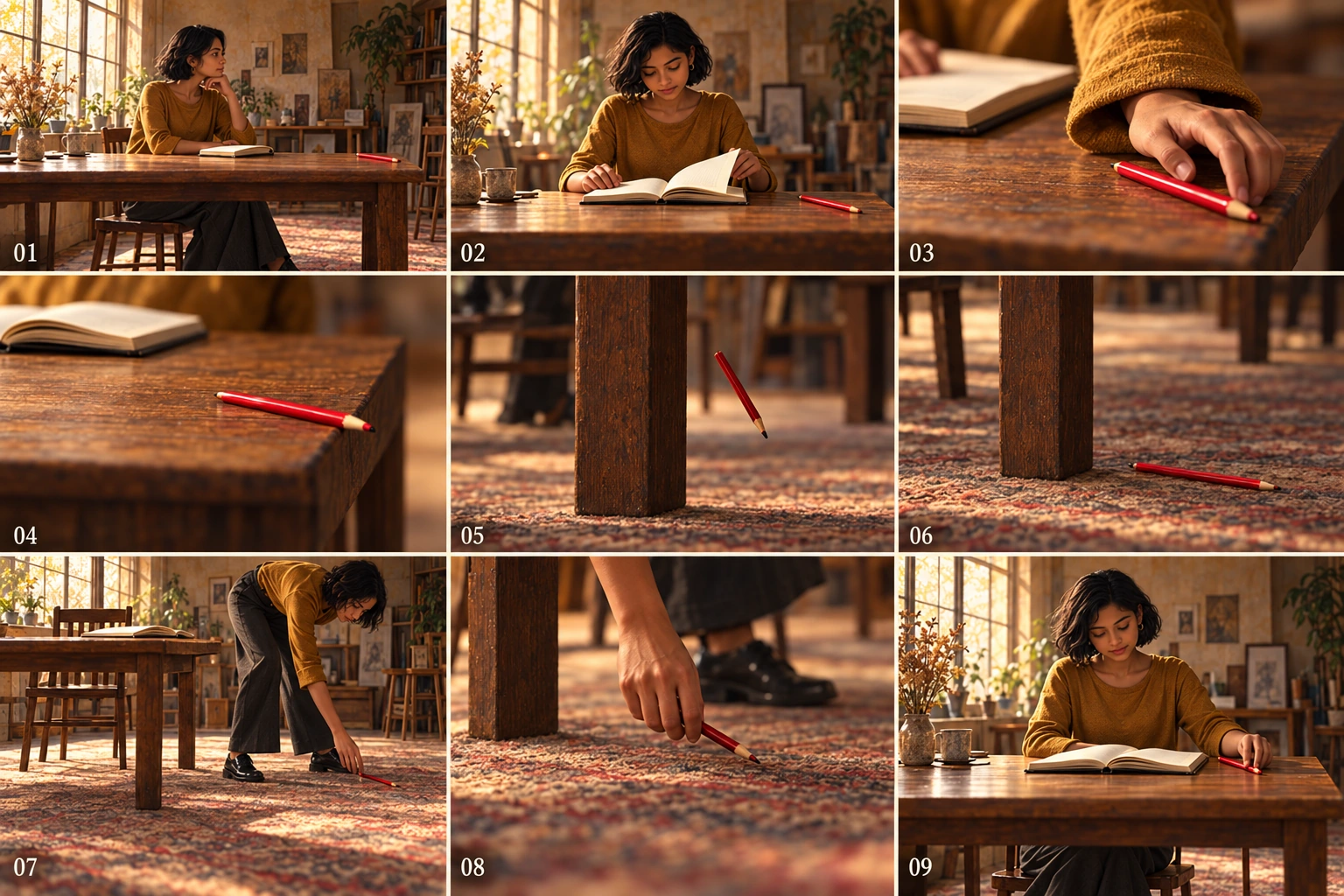
Codex生成の教材候補です。これらのずれは図のものであり、EveryGen AIのテスト結果や、EveryGen AIの失敗率の測定ではありません。
03のコマで原因を確認する
EveryGen AIの確認では、偶然の袖の接触と、候補の意図的に見える指の押し動作を区別します。
指示で原因を修正してください。「もっと自然な手」だけでは、意図した接触を指定できません。
05から08のコマで落下と拾い上げを追う
教材候補は、テーブルの脚の右への落下と着地、そこへ向かうMiraの移動を保っています。EveryGen AIでは、03のコマを修正する際にも、これらの関係を維持してください。
EveryGen AIのシートで、落下、着地、手を伸ばす動作、拾い上げを通して、テーブルの目印を追います。接写にしても、変わるのは画角です。鉛筆を移動させたり、複製を残したりしないようにしてください。
九コマ全体で物体の状態を追う
EveryGen AIの確認では、Miraとは別に、鉛筆の状態を追います。
天板 → 袖の接触 → 転がる → 落下 → 床 → 何も持っていない手を伸ばす → 手 → 天板。
次にEveryGen AIのノートを確認します。01では閉じていて、02以降は開いたままです。
明らかにおかしいコマが一つだけでも、EveryGen AIの流れ全体で、鉛筆の複製、理由なくノートが閉じること、服の変化、余分な手足、家具の移動がないか確認してください。
5. 保存した版から、絞った修正を行う
EveryGen AIの最初の候補を残します。画像から画像へ切り替え、選んだ版をアップロードするか、別の編集入口で既存のシートから流れを修正してください。
EveryGen AIの修正を、観察した連続性の問題に合わせます。全面的なスタイル変更と同時に行わないようにしてください。
03のコマの修正には、次を使います。
Edit the uploaded nine-panel storyboard.

In Panel 03, show the cuff of Mira's ochre sleeve making contact with the red pencil as she adjusts the notebook pages.
Keep her fingers away from the pencil so they do not push or flick it.

Preserve the panel number, the open notebook, the character design, and the overall sheet layout.
Keep the other eight panels unchanged.
Do not add objects or text.
EveryGen AIへほかのコマを保つよう求めることは、意図の表現であり、領域のロックではありません。
EveryGen AIのほかの位置の誤りにも、同じように範囲を絞った指示を使います。
| 対象 | 修正の依頼 |
|---|---|
| 05:落下する鉛筆 | “Use Panel 06’s landing location as the reference. In Panel 05, place the single pencil in midair to the viewer’s right of the visible right-hand table leg. Keep the table orientation consistent.” |
| 07:拾う位置 | “Show Mira out of her chair at the table’s right end, bending and extending an empty hand toward the pencil. Keep the pencil on the floor to the right of the right-hand leg. Do not move it beneath the table’s center.” |
保存した基準版と、EveryGen AIの修正版を比較します。受け入れる前に、対象外のコマも確認してください。
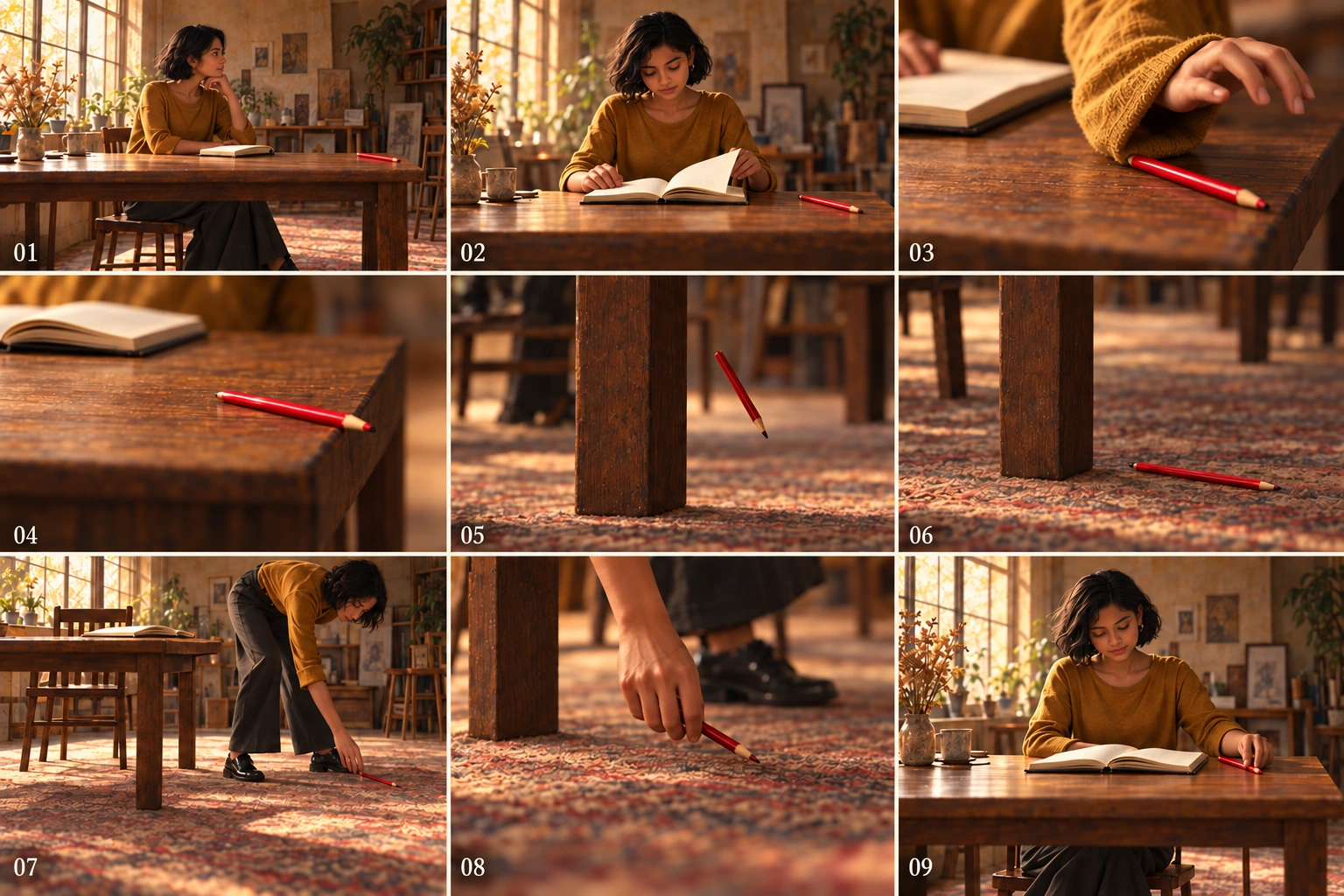
Codex生成の教材シートの修正版です。落下位置と拾う流れを保ちながら接触を修正しています。EveryGen AIの編集結果でも、幾何形状とカメラ位置の完全な維持を証明するものでもありません。
教材の修正版では、08のコマで唯一の鉛筆を持ち、床には残っていません。09のコマではMiraが席へ戻り、開いたノートの脇の天板に鉛筆一本があります。EveryGen AIの候補にも同じ状態の確認を行ってください。
対象のコマが改善しても、EveryGen AIの確認は終わりません。版を受け入れる前に、流れ全体をもう一度読みます。
6. 必要なら、個々のコマを外部で作り直す
局所的な修正で、EveryGen AIのシートの受け入れ済み部分まで変わり続けるなら、各セルを独立した編集可能なレイヤーと考えず、外部で合成します。
最後に受け入れたEveryGen AIのシートのコピーを、等しい画素座標と仮定せず、実際に見える境界に沿って外部で切り抜きます。動作と番号を保つか、番号を別に組版してください。
01-start、02-open-notebookから09-return-pencilのように、順序で切り抜きを保存します。人物の参考と、そのコマの動作指示を使い、置き換えるコマを別に制作または描画してから、外部のレイアウト文書で九枚を組み立てます。
これは手作業の切り抜きと合成です。EveryGen AIの手順に、自動分割の機能があるという意味ではありません。
EveryGen AIの切り抜きに含まれるのは、元の画素だけです。コマを拡大する前に実寸を確認してください。切り抜いても新しい細部は生まれません。
外部で組み立てた後に、EveryGen AIの流れの順序、コマ間の余白、番号、人物、鉛筆の経路全体を再確認します。正しいコマでも、位置が誤っていれば、誤った物語を伝えてしまいます。
7. 動画だと受け取られないよう、絵コンテとして引き渡す
選んだEveryGen AIのシート、九行の動作計画、使った参考、未解決の連続性のメモを引き渡します。元の版と受け入れた版を分け、書き出したファイルを開き直してください。
EveryGen AIの静止したシートは、動作と視点を提案するもので、長さ、再生、音声を設定しません。
後でタイミングを扱う際は、時間を付けた絵コンテをアニマティックにする方法を参照してください。この別の手順では、コマを順に並べ、音声を加えて間合いを試すことができます。EveryGen AIのコンタクトシートを、完成したアニメーションの演技へ変えるものではありません。
九コマは、九秒、九カット、独立して生成した高解像度の九フレームを意味しません。
鉛筆がなぜ落ちたのかを読み取れ、落下地点と拾う動作を追え、複製なく戻ったことを確認できたら、EveryGen AIの確認を終えます。意図した画角を説明する動作計画は残しつつ、動作は絵そのもので伝わることを求めてください。