 EveryGen AI
EveryGen AI · Hailuo 02 Pro for Deliberate Six-Second Video Shots
Turn a visual idea into a compact shot with Hailuo 02 Pro on H3 Max. Start with a written scene or an opening image, and add an ending image when the destination matters. Hailuo 02 Pro gives your brief a six-second, 1080p format for exploring a reveal, transition, or product moment.
Video workspace
The wooden elevator opens
28/33View prompt
Five-second continuous frontal shot of closed wooden elevator doors opening slowly to reveal one adult woman standing inside. Keep the camera fixed at eye level and the woman relaxed, facing forward. Preserve a simple, balanced composition with warm wood grain and soft interior light. End with the doors open and the woman still standing.
Introduction
What Is Hailuo 02 Pro?
Hailuo 02 Pro is a MiniMax video generation model with separate text-to-video and image-to-video routes available through fal.
A model with two visual starting points
The official fal listings identify Hailuo 02 Pro as the 1080p Pro tier of Hailuo 02. Its image route accepts an opening picture and an optional ending picture alongside the prompt. Hailuo 02 Pro therefore supports both imagining a scene from words and guiding a transition with supplied frames. These are generation workflows, not a conventional timeline for arranging existing footage.
A defined shot format on H3 Max
On H3 Max, Hailuo 02 Pro creates six-second clips at 1080p. Text mode begins without an uploaded picture; image mode uses your opening frame and can include a last frame. Describe a visible action that fits this duration, then check the workspace credits. The model has no audio switch here, so plan any required soundtrack separately rather than expecting sound from this workflow.
How to use
How to Create with Hailuo 02 Pro
- PromptSTEP 1
Select a visual starting point
Choose Hailuo 02 Pro in H3 Max. Start in text mode or upload an opening image in image mode; add an ending frame only when it serves the shot.
- ModelHailuo 02 Pro1080p16:96sPromptSTEP 2
Write the six-second action
Give Hailuo 02 Pro one main movement and a clear camera direction. Explain what should remain stable and how the scene should settle at the end.
- First frameLast frame
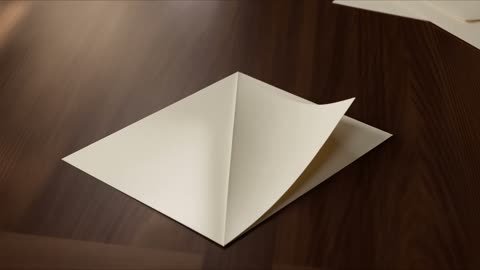 0.0s
0.0s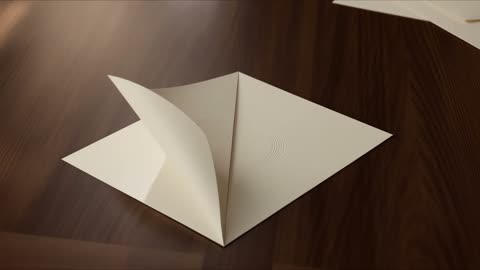 2.9s
2.9s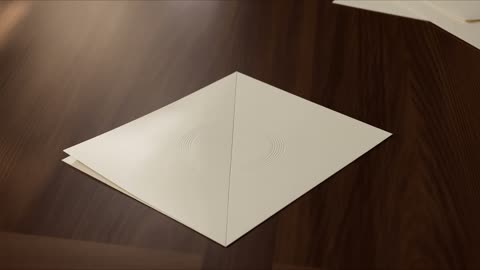 5.3sSTEP 3
Review the configured request
Confirm the six-second, 1080p setup and inspect any supplied images. Read the workspace credits before submitting, rather than relying on a price from another model or previous request.
- Create a single six-second shot of a folded cream paper invitation on a dark wooden desk. One corner slowly unfolds to reveal a simple embossed circular motif, then rests. Use a locked close view, soft side light, and realistic paper thickness. No readable text, hands, extra objects, camera shake, or scene cuts.DownloadSTEP 4
Inspect the complete result
Watch the Hailuo 02 Pro clip continuously, then pause around difficult motion. Compare it with your brief and revise one specific issue before making another request.
Features
Build a Complete Beat with Hailuo 02 Pro
Give Hailuo 02 Pro a beginning, one meaningful change, and a readable finish instead of compressing an entire story into one clip.
Choose the moment that earns the shot
A small reveal can communicate more than a sequence of unrelated movements. Ask Hailuo 02 Pro to show a folded card opening, a shadow moving off an object, or a person noticing something outside the frame. Write what changes and what stays still. Hailuo 02 Pro can then be assessed against a clear intention, rather than an abstract request to make everything cinematic.
Leave the viewer time to register the result
A six-second brief needs space around its main action. For Hailuo 02 Pro, describe a brief settled opening, a measured movement, and a final hold when that pacing suits the idea. Avoid giving every second another task. The last moment should show the result clearly enough that an editor can decide where the shot belongs in a larger sequence.
Anchor the Composition with Hailuo 02 Pro
An opening image gives Hailuo 02 Pro a concrete starting arrangement for subjects, surfaces, light, and the space around them.
Prepare an image that explains the subject
Use an uncluttered frame with the important object fully visible and enough surrounding room for the planned movement. Hailuo 02 Pro should not have to resolve an ambiguous silhouette before animating it. For a desk accessory, show its base and contact shadow. Tell Hailuo 02 Pro which proportions, colors, and placement should remain recognizable as the camera or subject moves.
Describe motion rather than restating the picture
Once the image establishes the setting, use the prompt to explain the change. Ask Hailuo 02 Pro for a gentle approach toward the subject or a slight movement of one visible element. Repeating every background detail can obscure that request. Give priority to the action, the camera behavior, and the features that matter most when comparing the returned clip with your original picture.
Plan a Destination for Hailuo 02 Pro
Use the optional ending image in Hailuo 02 Pro when the closing composition matters as much as the opening view.
Choose endpoints that belong to one transition
Two images are more useful when their relationship is understandable. For Hailuo 02 Pro, a slightly wider starting view and a closer ending view can describe a reveal without demanding an unrelated scene change. Keep the main object identifiable in both. Hailuo 02 Pro still generates the intervening motion, so matched endpoints should guide your review rather than replace it.
Inspect the journey between the supplied frames
An appealing opening and ending can hide an awkward middle. Watch Hailuo 02 Pro for drifting objects, sudden changes of scale, or a camera path that does not suit the intended move. Pause where one shape overlaps another. When the transition feels forced, reconsider the endpoint pair or simplify the requested action before adding more instructions to the same brief.
Direct Attention with Hailuo 02 Pro
Natural-language camera direction gives Hailuo 02 Pro a visual emphasis without requiring a complex sequence of competing movements.
Separate subject movement from camera movement
Decide whether the item moves, the viewpoint moves, or both. A stationary bottle with a slow camera approach is a different request from a rotating bottle under a locked camera. Tell Hailuo 02 Pro which relationship you need. Keep the Hailuo 02 Pro brief consistent throughout; describing a static shot and a sweeping orbit together makes the intended result harder to judge.
Give the movement a compositional reason
A camera move should reveal something useful: surface texture, a relationship between objects, or an expression becoming readable. With Hailuo 02 Pro, identify that purpose before choosing dramatic motion. Small movements can suit tight product framing, while an environmental reveal needs more visible context. Treat these as creative directions, not a promise of measured camera geometry or exact physical reconstruction.
Finish a Hailuo 02 Pro Shot with Care
Review Hailuo 02 Pro at its delivered 1080p size and inside the layout where the moving image will actually appear.
Check details that could change the meaning
Inspect fine edges, hands, printed marks, and contact points throughout the clip. Hailuo 02 Pro can produce a visually engaging interpretation without preserving every detail you intended. For product work, compare shape and labeling against the source. Select a Hailuo 02 Pro result because the whole moving scene supports the brief, not because one paused frame looks especially polished.
Keep revisions focused and costs visible
Before repeating a Hailuo 02 Pro request, name the specific problem: an abrupt ending, distracting background motion, or a subject that changes shape. Retain the instructions that already serve the shot and revise the smallest useful part. Check the credits displayed for Hailuo 02 Pro before submitting again, and save your chosen frames and prompt with the approved result.
Example prompts
Text: an unhurried paper reveal
Create a single six-second shot of a folded cream paper invitation on a dark wooden desk. One corner slowly unfolds to reveal a simple embossed circular motif, then rests. Use a locked close view, soft side light, and realistic paper thickness. No readable text, hands, extra objects, camera shake, or scene cuts.
Image: reveal a crafted surface
Use the uploaded image as the opening frame. Keep the main object stationary on its support while the camera makes a gentle approach over six seconds. Emphasize the visible surface texture without changing its shape, color, or proportions. Keep the background and lighting consistent. End on a settled view. Do not add people, lettering, or new props.
Two frames: a measured visual connection
Use the uploaded opening and ending images as the endpoints of one six-second shot. Connect them with a restrained continuous camera movement, keeping the shared subject grounded and recognizable. Preserve the general lighting and setting. Allow a brief hold at the end. Avoid sudden scale changes, new objects, cuts, and unrelated transformations.
User reviews
EveryGen AI video creator feedback.
EveryGen AI creator reviews

I made a full character PV for my game with MiniMax H3 in one afternoon. The menu UI stayed readable in every frame and the character never went off-model. That used to cost me a contractor and three weeks.

We tested every AI video generator on the market for stylized work. H3 is the only one that held our anime style across cuts. We now use it for pitch reels and animatics on every project.

I uploaded four product photos and got a listing video with music and a voiceover the same day. My click-through rate on the new listings is up 38%. H3 even got the label text on my packaging right.

I ship five vertical videos a week for three brands. MiniMax H3 gets me from brief to draft in under an hour, with sound already synced. My old workflow needed a videographer and two review rounds.

The editing side is what sold me. A client wanted the background of an interview changed — I typed one sentence into MiniMax H3 and the lighting on the subject matched the new scene automatically.

I previsualized my entire short film in MiniMax H3 before we shot a single frame. Rack focus, match cuts, even the title cards — it understands director language, not just keywords.
EveryGen AI · MiniMax H3 Max Pricing and Credit Plans
Cancel anytime
Lite
50% off0.025 / credit
Billed $ yearly179· Save $179.8
Video Models


Image Models



- Includes MiniMax H3 and all premium models
- Up to 1 batch generation task
- Standard generation speed
- Standard generation success rate
- Standard customer support
- Commercial Use License
Standard
50% off0.017 / credit
Billed $ yearly299· Save $299.8
Video Models
Image Models
- Includes MiniMax H3 and all premium models
- Up to 4 batch generation tasks
- Priority processing speed
- High generation success rate
- Priority customer support
- Commercial Use License
Pro
50% off0.014 / credit
Billed $ yearly599· Save $599.8
Video Models
Image Models
- Includes MiniMax H3 and all premium models
- Up to 10 batch generation tasks
- Fastest generation speed
- High generation success rate
- Dedicated account manager
- Commercial Use License
Max
50% off0.012 / credit
Billed $ yearly1,199· Save $1,199.8
Video Models
Image Models
- Includes MiniMax H3 and all premium models
- Up to 10 batch generation tasks
- Fastest generation speed
- High generation success rate
- Dedicated account manager
- Commercial Use License
Pay safely and securely with























FAQ
Frequently asked questions
What can I use to start Hailuo 02 Pro?
Choose text mode for a scene described in words, or image mode for a supplied opening picture. Image mode also accepts an optional last frame. Use each input to define a clear visual role.
What duration and resolution does Hailuo 02 Pro use here?
The H3 Max workflow uses six-second clips at 1080p. Build the action around that fixed duration. Writing a longer running time inside the prompt does not change the selected model configuration.
Are both images required for Hailuo 02 Pro?
No. An ending image is optional in image mode, while the opening image establishes the starting view. Use two frames when you have a specific destination, not simply to add more reference material.
Can Hailuo 02 Pro guarantee an exact product label?
No. Treat product wording, dimensions, and recognizable details as review requirements. Check the entire clip against your reference and reject changes that would present the item inaccurately, even when the motion looks attractive.
Does Hailuo 02 Pro provide an audio control?
There is no audio switch in this workspace configuration. Use the page to develop the visual shot, and arrange any required music, narration, or effects separately in your production workflow.
Can Hailuo 02 Pro replace a video editing timeline?
This workflow generates a short clip from your inputs; it is not a timeline editor for existing footage. You can evaluate the generated shot for later assembly with other material in an editor.
Where do I see the credits for Hailuo 02 Pro?
The workspace displays the credits for the configured request before generation. Review that amount after checking the inputs. This page does not promise a fixed completion time or a universal per-clip price.
CTA
Plan Your Next Hailuo 02 Pro Shot
Choose the image or idea that deserves six seconds of attention. Open Hailuo 02 Pro, define the movement and ending, and review the displayed credits before creating your next visual draft.
Open Video Workspace