 EveryGen AI
EveryGen AI · Seedance 1.5 Pro for Sound-Led Moments and Steady Framing
Shape a short scene around action, sound, and a deliberate viewpoint with Seedance 1.5 Pro on H3 Max. Start with text or frame images, then choose the duration and audio setting. Seedance 1.5 Pro also offers fixed-camera and seed controls for exploring a focused brief without changing every creative decision.
Video workspace
The wooden elevator opens
28/33View prompt
Five-second continuous frontal shot of closed wooden elevator doors opening slowly to reveal one adult woman standing inside. Keep the camera fixed at eye level and the woman relaxed, facing forward. Preserve a simple, balanced composition with warm wood grain and soft interior light. End with the doors open and the woman still standing.
Introduction
What Is Seedance 1.5 Pro?
Seedance 1.5 Pro is a ByteDance video generation model available on fal for creating video from text or images with optional audio.
A model for directing picture and sound
The official Seedance 1.5 Pro endpoints accept a prompt alongside video, audio, fixed-camera, and seed controls. The image route adds an opening picture and an optional ending picture. Seedance 1.5 Pro can therefore begin with a scene described from scratch or with chosen visual endpoints, while the audio option determines whether sound accompanies the requested clip.
A practical set of choices on H3 Max
On H3 Max, Seedance 1.5 Pro provides 480p, 720p, and 1080p output with four-, eight-, or twelve-second choices. Select text or image mode, configure audio, and request a fixed camera when appropriate. Keep the written brief consistent with those decisions: a stationary viewpoint and a sweeping camera move are conflicting directions, not two complementary ways to describe the same shot.
How to use
How to Create with Seedance 1.5 Pro
- PromptSTEP 1
Pick text or image mode
Select Seedance 1.5 Pro. Describe a new scene in text mode, or provide an opening frame in image mode. Add a last frame when the ending composition is important.
- ModelSeedance 1.5 Pro480p16:98sPromptSTEP 2
Write the action and sound
Give Seedance 1.5 Pro a concise visible action. Include relevant ambience or a short spoken line when using audio, and identify the elements that should remain stable.
- First frameLast frame
 0.0s
0.0s 4.0s
4.0s 7.2sSTEP 3
Set the available controls
Choose four, eight, or twelve seconds and an available resolution. Set audio, fixed camera, and seed as needed, then check the Seedance 1.5 Pro workspace credits.
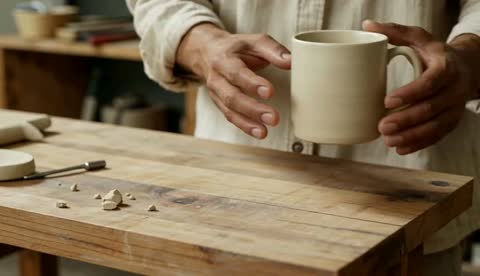
- Create an eight-second shot of an adult ceramicist gently setting an unmarked cream cup on a wooden workbench. The camera stays at a fixed medium-close viewpoint. Preserve the cup handle and keep the bench still. Include one soft ceramic contact sound and quiet studio ambience, no dialogue or music. Finish with the hand withdrawing and the cup resting securely.DownloadSTEP 4
Review before revising
Watch the Seedance 1.5 Pro take, listen to its soundtrack, and inspect the important object details. Preserve successful settings and change one observable issue when making the next request.
Features
Connect Visible Events and Sound with Seedance 1.5 Pro
Give Seedance 1.5 Pro an audible event that belongs to the action, rather than adding an unrelated soundtrack description afterward.
Choose a recognizable sound for Seedance 1.5 Pro
A ceramicist setting a cup on a workbench offers a simple relationship between movement and sound. Describe the hand lowering the cup, the light contact, and the quieter room behind it. Seedance 1.5 Pro can be directed toward that relationship through the prompt. Ask Seedance 1.5 Pro for restrained ambience so a loud musical layer does not obscure the small event you are trying to show.
Make dialogue fit the available moment
For a speaking scene, identify the speaker and give them one short line rather than a paragraph of narration. Allow room for a pause or reaction. Review Seedance 1.5 Pro speech for the intended words, timing, and tone; generated dialogue should not be treated as an exact recording. Turn audio off when the clip needs a separately produced voiceover or a consistent soundtrack across several shots.
Give Seedance 1.5 Pro a Planned Visual Transition
Opening and optional ending images let Seedance 1.5 Pro work between compositions you have already chosen for the scene.
Make the first frame a useful starting state
Show the subject, its support surface, and enough surrounding space for the movement. For a cup-placement scene, the opening might show the hand holding the cup just above the bench. Ask Seedance 1.5 Pro to preserve its shape and finish while completing the action. Avoid instructions that immediately replace the supplied composition, since that removes the main reason for beginning from an image.
Define completion in the Seedance 1.5 Pro last frame
An ending picture can establish where the cup should rest and where the hand should finish. Explain the action joining those states in the Seedance 1.5 Pro prompt. Compatible lighting and subject proportions give you a clearer target for reviewing the transition. Watch the entire Seedance 1.5 Pro clip for changing handles, floating contact points, or an unexplained object appearing between the two intended endpoints.
Stage a Stable Viewpoint with Seedance 1.5 Pro
The fixed-camera option in Seedance 1.5 Pro requests a stationary camera position while leaving room for action within the composition.
Let the subject provide the movement
Use a fixed viewpoint when the movement itself matters more than a camera reveal: a hand arranging tools, a lid being closed, or a person pausing before speaking. Seedance 1.5 Pro framing can then be judged against a simple visual arrangement. Tell Seedance 1.5 Pro which action should occur inside that frame, keeping unnecessary background motion out of the brief so the main change remains readable.
Do not confuse camera stability with a frozen scene
The fixed-camera control concerns viewpoint, not a promise that every object will remain unchanged. A subject can move while the camera stays in place. With Seedance 1.5 Pro, avoid combining the control with a request to orbit or pull away. Review the background edges and subject placement for unintended drift, then simplify the motion instruction when the result does not match the intended staging.
Match Seedance 1.5 Pro to the Scene Length
Choose four, eight, or twelve seconds in the Seedance 1.5 Pro workspace according to the amount of action the viewer needs to see.
Use short duration for a single clear event
A four-second clip can focus on an object settling or a brief expression changing. Eight seconds leaves more room for preparation and a response. Give Seedance 1.5 Pro a task that fits the selected window instead of compressing a complete narrative into it. State when the main movement should happen in ordinary language, and leave enough time for the viewer to register its consequence.
Keep a longer scene connected
For twelve seconds, describe related actions rather than several disconnected highlights. The cup is lowered, the hand releases it, and the person steps back to inspect the arrangement. Ask Seedance 1.5 Pro for a measured progression with consistent surroundings. Review whether Seedance 1.5 Pro uses the extra time purposefully, and shorten or simplify the brief when the scene merely repeats an already completed gesture.
Compare Seedance 1.5 Pro Variations Deliberately
Seed and output controls help organize Seedance 1.5 Pro requests, but the final choice should follow the actual picture and sound.
Keep the Seedance 1.5 Pro experiment understandable
When testing lighting or a spoken line, retain the other settings and record the seed. Seedance 1.5 Pro uses this as a generation input, not an identical-repeat guarantee. Compare the intended difference while allowing for variation. Keep the same image inputs when their subject and composition are not the factors being tested.
Inspect detail without losing sight of the action
Choose 480p, 720p, or 1080p for the current task, then check the completed Seedance 1.5 Pro clip at normal speed. Examine important edges and materials, and listen separately for unwanted sound. A sharper-looking frame does not excuse a broken action. Check the Seedance 1.5 Pro credits before generating again, especially after changing duration, output size, or audio settings that may affect the quote.
Example prompts
Text with audio: place a ceramic cup
Create an eight-second shot of an adult ceramicist gently setting an unmarked cream cup on a wooden workbench. The camera stays at a fixed medium-close viewpoint. Preserve the cup handle and keep the bench still. Include one soft ceramic contact sound and quiet studio ambience, no dialogue or music. Finish with the hand withdrawing and the cup resting securely.
Image endpoints: complete the arrangement
Use the supplied first and last images as endpoints for a twelve-second scene. The adult hand slowly lowers the cup to the position shown in the ending image, releases it, and withdraws. Keep the camera stationary, preserve the cup proportions, and maintain the original side lighting. Gentle contact sound and subdued room tone, without speech. Hold the completed arrangement briefly.
Text with a short spoken line
Create an eight-second scene in a quiet pottery studio. An adult instructor, seen at a fixed medium viewpoint, looks toward a newly finished bowl and says, "Let it rest here." A small natural gesture toward the bowl follows the line. Warm window light and subtle room ambience. No music, extra people, captions, or camera movement. Keep the bowl stationary.
User reviews
EveryGen AI video creator feedback.
EveryGen AI creator reviews

I made a full character PV for my game with MiniMax H3 in one afternoon. The menu UI stayed readable in every frame and the character never went off-model. That used to cost me a contractor and three weeks.

We tested every AI video generator on the market for stylized work. H3 is the only one that held our anime style across cuts. We now use it for pitch reels and animatics on every project.

I uploaded four product photos and got a listing video with music and a voiceover the same day. My click-through rate on the new listings is up 38%. H3 even got the label text on my packaging right.

I ship five vertical videos a week for three brands. MiniMax H3 gets me from brief to draft in under an hour, with sound already synced. My old workflow needed a videographer and two review rounds.

The editing side is what sold me. A client wanted the background of an interview changed — I typed one sentence into MiniMax H3 and the lighting on the subject matched the new scene automatically.

I previsualized my entire short film in MiniMax H3 before we shot a single frame. Rack focus, match cuts, even the title cards — it understands director language, not just keywords.
EveryGen AI · MiniMax H3 Max Pricing and Credit Plans
Cancel anytime
Lite
50% off0.025 / credit
Billed $ yearly179· Save $179.8
Video Models


Image Models



- Includes MiniMax H3 and all premium models
- Up to 1 batch generation task
- Standard generation speed
- Standard generation success rate
- Standard customer support
- Commercial Use License
Standard
50% off0.017 / credit
Billed $ yearly299· Save $299.8
Video Models
Image Models
- Includes MiniMax H3 and all premium models
- Up to 4 batch generation tasks
- Priority processing speed
- High generation success rate
- Priority customer support
- Commercial Use License
Pro
50% off0.014 / credit
Billed $ yearly599· Save $599.8
Video Models
Image Models
- Includes MiniMax H3 and all premium models
- Up to 10 batch generation tasks
- Fastest generation speed
- High generation success rate
- Dedicated account manager
- Commercial Use License
Max
50% off0.012 / credit
Billed $ yearly1,199· Save $1,199.8
Video Models
Image Models
- Includes MiniMax H3 and all premium models
- Up to 10 batch generation tasks
- Fastest generation speed
- High generation success rate
- Dedicated account manager
- Commercial Use License
Pay safely and securely with























FAQ
Frequently asked questions
What inputs does Seedance 1.5 Pro accept here?
Use text mode for a written scene, or image mode with an opening picture and an optional ending picture. These are frame-based image inputs, not a mixed collection of reference videos, images, and audio clips.
Which durations can I choose?
Seedance 1.5 Pro offers four, eight, and twelve seconds in the H3 Max workspace. Pick the duration that fits the event. Keep a short clip focused, and use a longer setting for related actions that need breathing room.
Can Seedance 1.5 Pro generate audio?
Yes. Enable the audio option and describe the sound that belongs to the scene. You can also turn audio off. Review dialogue, effects, and synchronization before choosing a generated clip for a finished project.
What does fixed camera control do?
Seedance 1.5 Pro uses this option to request a fixed camera position. It does not freeze the subject or guarantee an unchanged background. Describe the movement inside the frame, and avoid asking for a camera orbit at the same time.
Does Seedance 1.5 Pro support a last image?
Yes. Image mode accepts an optional ending frame alongside the opening frame. Keep the two images compatible when you want a continuous scene, and describe the motion between them. Check the transition rather than reviewing only its endpoints.
Will repeating a seed reproduce the exact video?
Seedance 1.5 Pro exposes a seed input, but exact reproduction is not promised here. Keep the prompt, source images, and other settings unchanged for a useful comparison. Treat any repeated request as a new result that needs inspection.
Where do I select resolution and check credits?
The Seedance 1.5 Pro workspace offers 480p, 720p, and 1080p output and displays credits before submission. Review the quote after configuring duration, audio, and inputs rather than assuming a fixed per-clip price.
CTA
Direct a Complete Moment with Seedance 1.5 Pro
Choose a scene, a viewpoint, and the sound it needs. Review the settings and credits, then create a Seedance 1.5 Pro take on H3 Max that you can assess as a whole.
Create a Short Scene