 EveryGen AI
EveryGen AI · Hailuo 2.3 Standard for Gestures, Atmosphere, and Visual Studies
Find the movement inside an idea with Hailuo 2.3 Standard on H3 Max. Create from words or one opening image, using six or ten seconds at 768p. Hailuo 2.3 Standard lets you explore a small action, an illustrated moment, or a scene whose atmosphere develops gradually without needing a supplied ending frame.
Video workspace
The wooden elevator opens
28/33View prompt
Five-second continuous frontal shot of closed wooden elevator doors opening slowly to reveal one adult woman standing inside. Keep the camera fixed at eye level and the woman relaxed, facing forward. Preserve a simple, balanced composition with warm wood grain and soft interior light. End with the doors open and the woman still standing.
Introduction
What Is Hailuo 2.3 Standard?
Hailuo 2.3 Standard is a MiniMax video model available on fal for generating scenes from text or an initial image.
The Standard tier of the 2.3 family
Official fal pages identify Hailuo 2.3 Standard as the 768p Standard offering, with separate text-to-video and image-to-video endpoints. The image endpoint takes a first-frame picture, and its duration options include six and ten seconds. Hailuo 2.3 Standard can therefore begin with an invented scene or a concrete visual starting point. It does not require a paired ending image to generate motion.
A straightforward configuration on H3 Max
Choose Hailuo 2.3 Standard for text or single-image generation at 768p, then select six or ten seconds. The image workflow accepts one opening reference and does not provide an ending-image slot. Keep the prompt focused on how that starting situation develops. Review the displayed credits before submission; audio controls are not offered for this model in the workspace.
How to use
How to Create with Hailuo 2.3 Standard
- PromptSTEP 1
Choose your starting view
Open Hailuo 2.3 Standard in H3 Max. Write a scene in text mode or select one opening image that clearly shows the subject you intend to animate.
- ModelHailuo 2.3 Standard768p16:96sPromptSTEP 2
Describe a manageable change
Tell Hailuo 2.3 Standard which element moves and which details remain stable. Include a simple camera direction and an intended finishing state without requiring a second image.
- First frameLast frame
 0.0s
0.0s 2.9s
2.9s 5.3sSTEP 3
Set duration and review credits
Select six or ten seconds at 768p. Check that the action fits the chosen length, inspect your image when present, and review the displayed request credits.
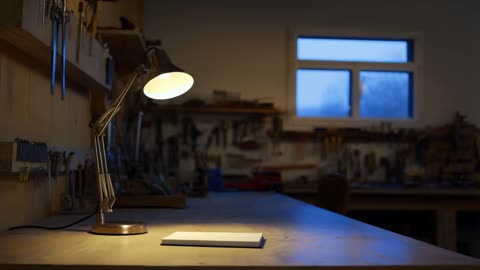
- Create a single six-second shot of a small workshop at dusk. An unbranded adjustable desk lamp slowly tilts toward a closed notebook, then stops. Keep the workbench and surrounding tools stationary. Use a locked medium view and soft blue window light with a warm pool of lamplight. No people, lettering, extra props, or cuts.DownloadSTEP 4
Compare the result with your aim
Watch the Hailuo 2.3 Standard clip at normal speed and examine difficult moments. Keep useful visual choices and revise the one issue that most affects the scene.
Features
Study the Timing of an Action with Hailuo 2.3 Standard
Use Hailuo 2.3 Standard to explore when a movement begins, how it develops, and how much time its conclusion deserves.
Keep short gestures self-contained
A glance, a turn, or a hand reaching toward an object can form the center of a six-second study. Give Hailuo 2.3 Standard a specific starting posture and a clear action. Avoid stacking several gestures together merely because they fit in a sentence. A Hailuo 2.3 Standard result is more useful when you can explain which part of the performance you are evaluating.
Give slower actions room without adding new events
For a ten-second request, let the same action develop more gradually or allow a longer settled finish. Tell Hailuo 2.3 Standard whether the movement should feel hesitant, measured, or steady through visible timing rather than a complex backstory. Evaluate what actually happens: a longer duration does not automatically preserve a shorter version frame for frame or convert it into slow motion.
Bring an Illustrated Starting Point to Hailuo 2.3 Standard
An illustration can provide Hailuo 2.3 Standard with a defined composition while your instructions describe a small movement within that visual world.
Prepare a readable silhouette for Hailuo 2.3 Standard
Start from artwork where the important character or object is easy to distinguish from its surroundings. Hailuo 2.3 Standard can be asked to develop a modest action from that image, such as a paper character lifting a hand. Describe the visual qualities you want maintained. Treat Hailuo 2.3 Standard as a generation tool, not a guarantee of frame-perfect drawing consistency or a rigged animation system.
Limit movement to what supports the artwork
A subtle sway or a small change of pose may suit a detailed illustration better than a large rotation. Ask Hailuo 2.3 Standard to keep the overall palette and composition recognizable while the selected element moves. Review outlines and decorative details for unwanted changes. This produces a video interpretation of the image, not editable animation layers or a reusable character rig for another application.
Build Visual Atmosphere with Hailuo 2.3 Standard
A scene can feel active without a dramatic event; Hailuo 2.3 Standard gives you a way to explore that quieter kind of movement.
Pick the detail that makes the place feel alive
Consider a hanging sign moving slightly outside a closed shop, or reflections shifting on a rain-darkened walkway. Name that detail in your Hailuo 2.3 Standard prompt and keep the surrounding architecture settled. Hailuo 2.3 Standard should be directed toward the visible motion that communicates the atmosphere. You do not need to add people, moving vehicles, and changing weather to every environmental scene.
Keep the visual mood independent of promised sound
Plan the atmosphere through lighting, movement, and composition rather than assuming a soundtrack will explain the scene. Hailuo 2.3 Standard has no audio switch on this page. A useful visual brief should still communicate its main idea without narration. Watch whether the setting remains coherent as small elements move, and arrange any necessary sound separately when assembling the broader project.
Explore a Fresh View with Hailuo 2.3 Standard
Text mode gives Hailuo 2.3 Standard a starting point when you have a shot idea but no existing picture to animate.
Write a scene with a clear visual hierarchy
Begin with the main subject and its position, then add a small number of setting details and the intended movement. Hailuo 2.3 Standard does not need several competing focal points. For a workshop study, a moving lamp and a single workbench may be enough. Keep the Hailuo 2.3 Standard brief specific about what the viewer should notice first and what should remain background context.
Describe camera behavior in ordinary shot language
A static view, a restrained approach, or gentle tracking can each support a different idea. Tell Hailuo 2.3 Standard how the viewpoint should relate to the subject, without treating the prompt as a numerical camera editor. Avoid contradictory instructions. After generation, judge whether the camera makes the action easier to follow and whether important details remain inside the composition throughout the clip.
Compare Visual Choices with Hailuo 2.3 Standard
Organize Hailuo 2.3 Standard experiments around a question so each new clip contributes to a creative decision instead of becoming another disconnected option.
Test one direction while preserving the brief
You might compare a closer view with a wider composition, or a quieter gesture with a more noticeable one. State the purpose before making a Hailuo 2.3 Standard request. Keep other scene instructions stable where possible. Hailuo 2.3 Standard outputs are generated interpretations, so compare their actual clarity and continuity rather than assuming that one changed phrase produces an otherwise identical clip.
Evaluate Hailuo 2.3 Standard in its viewing context
Review Hailuo 2.3 Standard at 768p and at the size where the clip will be displayed. Look for readable movement, stable silhouettes, and a finish that supports the surrounding material. Save the chosen prompt and opening image with your selection. Before another Hailuo 2.3 Standard variation, check the workspace credits and decide whether the expected creative benefit justifies another request.
Example prompts
Text: a restrained workshop study
Create a single six-second shot of a small workshop at dusk. An unbranded adjustable desk lamp slowly tilts toward a closed notebook, then stops. Keep the workbench and surrounding tools stationary. Use a locked medium view and soft blue window light with a warm pool of lamplight. No people, lettering, extra props, or cuts.
Image: a gentle illustrated greeting
Use the supplied illustration as the first frame. Over six seconds, let the main character raise one visible hand in a small greeting and lower it. Aim to retain the artwork palette, recognizable silhouette, and background arrangement. Keep the camera still and the gesture simple. Do not add characters, change the drawing style, or introduce text.
Image: a ten-second environmental detail
Begin from the uploaded image. Create a ten-second shot with a very gentle movement in the visible fabric or hanging decoration while the architecture and furniture remain stable. Preserve the general light and composition. Let the motion ease and settle toward the end. No new people, sudden weather changes, additional objects, or scene transitions.
User reviews
EveryGen AI video creator feedback.
EveryGen AI creator reviews

I made a full character PV for my game with MiniMax H3 in one afternoon. The menu UI stayed readable in every frame and the character never went off-model. That used to cost me a contractor and three weeks.

We tested every AI video generator on the market for stylized work. H3 is the only one that held our anime style across cuts. We now use it for pitch reels and animatics on every project.

I uploaded four product photos and got a listing video with music and a voiceover the same day. My click-through rate on the new listings is up 38%. H3 even got the label text on my packaging right.

I ship five vertical videos a week for three brands. MiniMax H3 gets me from brief to draft in under an hour, with sound already synced. My old workflow needed a videographer and two review rounds.

The editing side is what sold me. A client wanted the background of an interview changed — I typed one sentence into MiniMax H3 and the lighting on the subject matched the new scene automatically.

I previsualized my entire short film in MiniMax H3 before we shot a single frame. Rack focus, match cuts, even the title cards — it understands director language, not just keywords.
EveryGen AI · MiniMax H3 Max Pricing and Credit Plans
Cancel anytime
Lite
50% off0.025 / credit
Billed $ yearly179· Save $179.8
Video Models


Image Models



- Includes MiniMax H3 and all premium models
- Up to 1 batch generation task
- Standard generation speed
- Standard generation success rate
- Standard customer support
- Commercial Use License
Standard
50% off0.017 / credit
Billed $ yearly299· Save $299.8
Video Models
Image Models
- Includes MiniMax H3 and all premium models
- Up to 4 batch generation tasks
- Priority processing speed
- High generation success rate
- Priority customer support
- Commercial Use License
Pro
50% off0.014 / credit
Billed $ yearly599· Save $599.8
Video Models
Image Models
- Includes MiniMax H3 and all premium models
- Up to 10 batch generation tasks
- Fastest generation speed
- High generation success rate
- Dedicated account manager
- Commercial Use License
Max
50% off0.012 / credit
Billed $ yearly1,199· Save $1,199.8
Video Models
Image Models
- Includes MiniMax H3 and all premium models
- Up to 10 batch generation tasks
- Fastest generation speed
- High generation success rate
- Dedicated account manager
- Commercial Use License
Pay safely and securely with























FAQ
Frequently asked questions
What does Hailuo 2.3 Standard support on this page?
The workspace provides text-to-video and image-to-video at 768p, with six-second and ten-second duration options. Image mode uses one supplied starting picture. Select the mode and duration before submitting the request.
Can Hailuo 2.3 Standard accept an ending image?
No. This configuration accepts one opening image, not a first-and-last-frame pair. Describe the desired final posture or composition in words, then review how the generated action reaches it. A written ending is guidance, not a locked frame.
Can I animate an illustration with Hailuo 2.3 Standard?
You can use an illustration as the opening image and describe a modest movement. Inspect whether its palette, outlines, and recognizable features remain suitable. The result is a generated video, not an editable animation rig or layer stack.
Does Hailuo 2.3 Standard need an input image in text mode?
No. Build the scene through a prompt describing the subject, surroundings, lighting, action, and camera. Keep those directions consistent and focus on a small visual idea that fits the selected duration.
Does Hailuo 2.3 Standard include an audio switch?
No audio control is exposed for this model in H3 Max. Do not rely on a promise of generated dialogue, music, or effects. Plan the visual clip here and prepare any necessary sound separately.
Is a longer Hailuo 2.3 Standard clip always preferable?
No. Six seconds can suit an immediate gesture, while ten seconds may serve a gradual action. Choose according to the shot, not the assumption that extra duration guarantees better consistency or more useful detail.
Where are Hailuo 2.3 Standard credits shown?
The workspace shows the credits for your configured generation before submission. Recheck the amount when changing duration or other available settings, and give each revision a specific purpose before creating another version.
CTA
Explore a Visual Idea with Hailuo 2.3 Standard
Choose one action, one scene, and enough time for it to read. Open Hailuo 2.3 Standard, review your starting material and credits, and create a motion study with a clear purpose.
Explore Video Creation