 EveryGen AI
GPT-Image-2 in Practice: Turn Yourself (or Anything) into an Action Figure (Blister Pack / Vinyl Toy / Trading Card)
Create a boxed AI figure concept and verify the character, packaging labels, compartments, and every accessory.
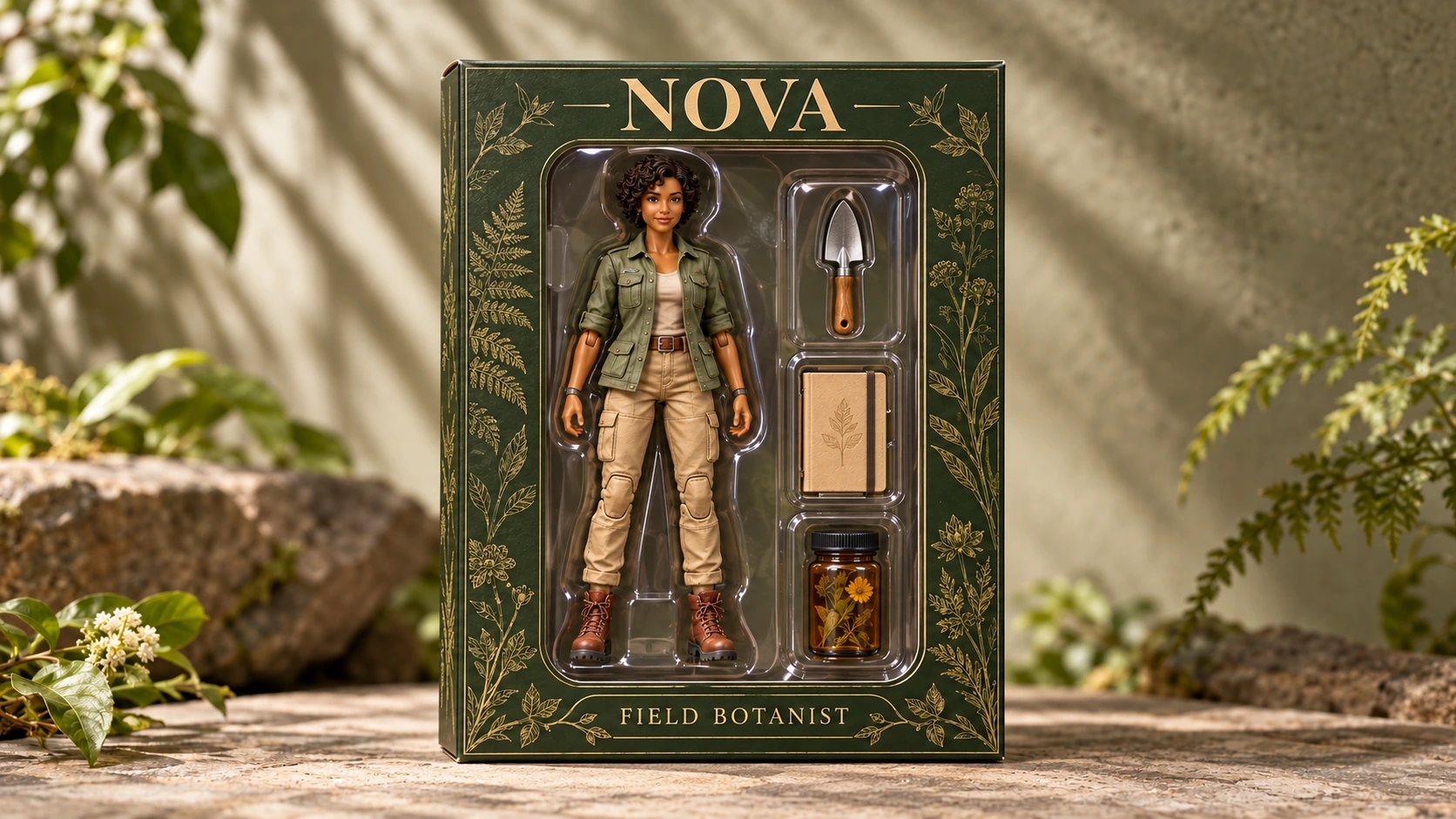
A boxed figure can look convincing while carrying the wrong equipment. Three accessory slots are not enough: the objects inside them must also match the brief.
This walkthrough creates a concept for NOVA, an original adult female field botanist. The package contains one complete figure, three specified accessories, and two labels. You will start from text, inspect the contents, and use a focused image revision when a candidate gets something wrong.
The deliverable is a flat packaging concept image, not a physical toy or a manufacturing file. The two illustrations below are Codex-generated teaching examples, not EveryGen AI test outputs or photographs of an existing product.
1. Write the inventory before describing the finish
Define NOVA’s appearance first: warm brown skin, short dark curly hair, a sage-green jacket, sand-colored cargo trousers, and rust-brown boots.
She should look like an articulated plastic toy, with her entire body visible in the large compartment on the viewer’s left. Both hands are empty. Keeping the accessories out of her hands makes their number and placement easier to check.
Use this inventory as the source of truth:
| Package area | Required contents |
|---|---|
| Large compartment on the left | One complete NOVA figure |
| Top accessory slot on the right | One silver hand trowel |
| Middle accessory slot on the right | One closed beige field notebook |
| Bottom accessory slot on the right | One amber specimen jar with its lid attached |
The three accessory slots form one vertical column. Each contains one object, with visible separation from its neighbors. The jar and its attached lid count as one accessory; there should not be a loose extra cap.
Use only these two labels:
NOVA
FIELD BOTANIST
Place NOVA on the upper cardboard panel and FIELD BOTANIST on the lower panel. Do not add accessory captions, invented brand marks, barcodes, prices, or certification badges.
Adobe’s action-figure concept guide recommends describing the costume, accessories, finish, and packaging. For this example, make the inventory and compartment layout explicit before adding the plastic textures and lighting.
2. Switch to Text to Image and choose a portrait layout
Open EveryGen AI to compose an original boxed figure.
The interface checked on September 30, 2026, defaults to Image to Image, with GPT Image 2, 1:1, 1K, JPEG, and x1. This original-character exercise starts from words, so switch to Text to Image. The reference-upload controls disappear in that mode; you do not need an existing character picture.
Change the aspect ratio from the default 1:1 to 2:3.
| Setting | Choice for this walkthrough |
|---|---|
| Mode | Text to Image |
| Model | GPT Image 2 |
| Aspect ratio | 2:3 portrait |
| Resolution preset | 1K |
| Output format | JPEG |
| Output count | x1 |
The x1 setting requests one output image. It does not replace the need to specify and count the figures and objects within that image.
A reference-based variation is possible when you already have a character image you have permission to use: start in Image to Image instead. That is an optional branch, not a requirement for the NOVA prompt below.
3. Use a complete packaging prompt
Paste this prompt after selecting the settings:
Create one 2:3 portrait image of an original boxed action-figure concept.

Character:
NOVA is an original adult female field botanist.
She has warm brown skin and short dark curly hair.
She wears a sage-green jacket, sand-colored cargo trousers, and rust-brown boots.

Show exactly one complete plastic toy figure of NOVA.
Give the figure an articulated-toy appearance with restrained visible joint seams.
Use a neutral standing pose with both arms visible and both hands empty.
Show the entire head, both hands, both legs, and both boots.
Do not portray a real person standing inside a box.

Packaging:
Use a deep forest-green cardboard box with a clear plastic display window.
Show the package directly from the front, with no strong perspective distortion.
Keep all four box corners and the entire package inside the frame.
Use a plain neutral background.

Inside the package:
Place the figure in one large molded tray compartment on the VIEWER'S LEFT.

On the VIEWER'S RIGHT, place exactly three separate accessory slots in a single vertical column.
Each slot must contain exactly one accessory.

TOP SLOT:
One silver hand trowel.

MIDDLE SLOT:
One closed beige field notebook.

BOTTOM SLOT:
One amber specimen jar with its lid attached.

The accessory inventory is exactly:
one trowel, one notebook, and one capped jar.

Keep each accessory fully visible and separate from the other accessories and the figure.
Make the notebook clearly closed.
Make the jar clearly recognizable as a container with its cap attached.
Do not place an accessory in the figure's hands.
Do not add a second notebook, a second jar, or a loose cap.

Text:
On the upper cardboard panel, render exactly:
NOVA

On the lower cardboard panel, render exactly:
FIELD BOTANIST

Use clear uppercase lettering with strong contrast.
Render each label exactly once.
Do not add other text, numbers, logos, barcodes, badges, prices, signatures, registration marks, or certification symbols.

Materials and lighting:
Show matte forest-green cardboard, molded plastic toy surfaces, a clear plastic window, and separate shaped tray compartments.
Use soft studio-style lighting with restrained reflections.
Keep the face, both labels, and all three accessories easy to inspect.
Do not hide objects behind glare.

Exclusions:
No extra figures, extra hands, extra limbs, display stands, plants, flowers, background scenery, loose equipment, or decorative objects.
No additional accessory slots.
No split-screen comparison or alternate package view.
Confirm the mode and settings, then review the credit amount displayed on Create before submitting. The displayed amount is dynamic; this walkthrough does not assume a fixed price or completion time.
Save the candidate you intend to review, together with the prompt and settings. Treat the instructions as the specification to check—not a guarantee that every item and word will be correct.
4. Count first, then inspect the packaging
Start with the teaching error example below. Read the three accessory slots from top to bottom and compare them with the inventory table.
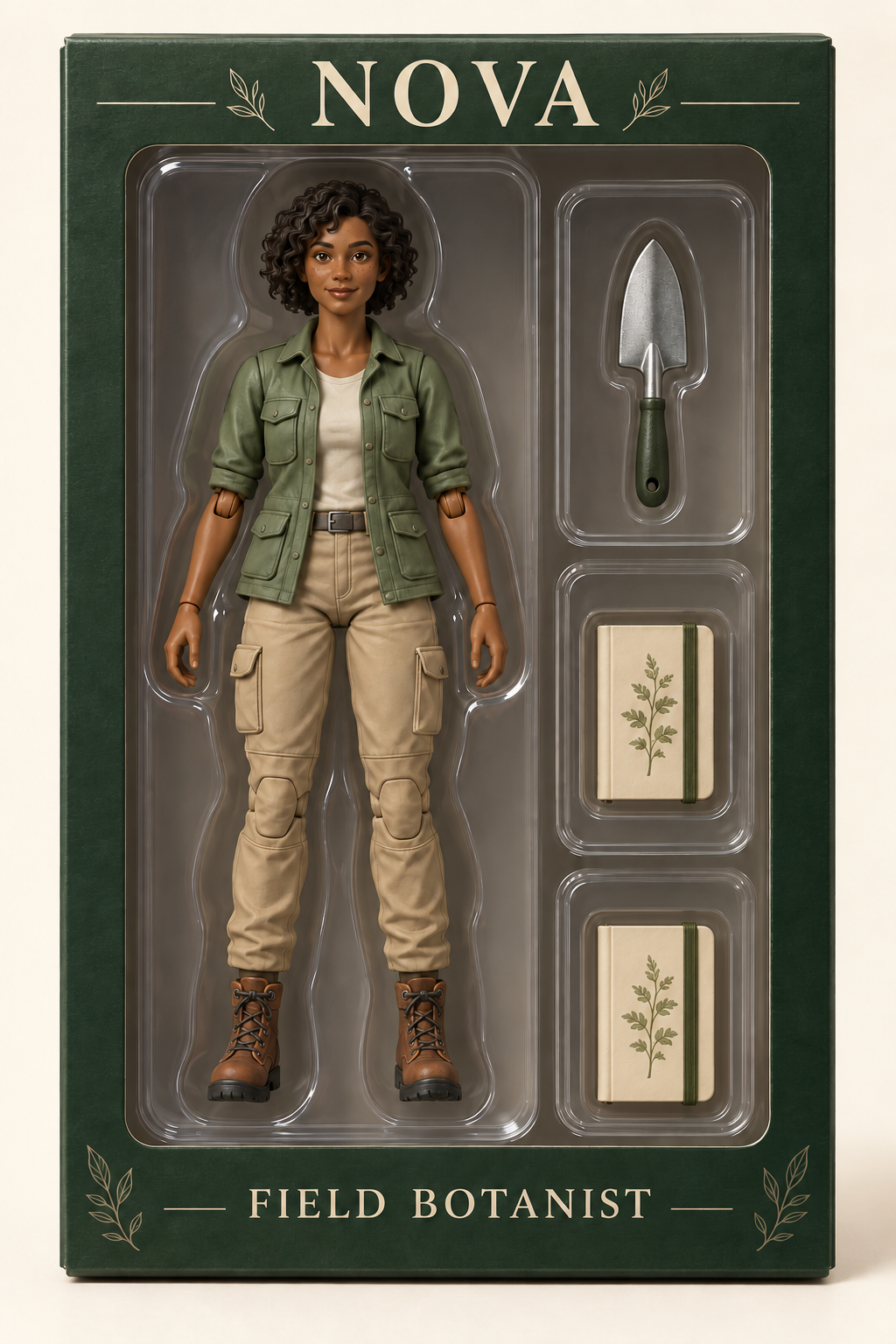
Codex-generated, deliberately constructed inventory error: the lower slot contains a second notebook instead of the capped amber jar. This is a teaching example, not an observed EveryGen AI failure.
Count objects and identify them
The example has one figure and three occupied accessory slots, but the inventory is still wrong. It contains a trowel and two notebooks, with no specimen jar.
Check both quantity and identity. “Three accessories” is not equivalent to “one trowel, one notebook, and one capped jar.”
Inspect the figure’s hands and the rest of the box too. An additional notebook held by NOVA, a loose cap beside the jar, or an object hidden near her boots would also change the inventory.
Read the two labels
Compare the image directly with the written copy. The upper panel must read NOVA, and the lower panel must read FIELD BOTANIST.
Check letter order, missing characters, duplicated words, and unwanted text elsewhere. Do not accept approximately correct lettering because the packaging looks polished.
Check the compartments and the figure
There should be one large figure compartment on the left and three distinct accessory slots on the right. Follow the boundary of each slot. Look for a notebook merged into the tray, a trowel passing into the next compartment, or a jar that appears attached to NOVA.
Then inspect the complete figure. Confirm the specified hair, skin tone, jacket, trousers, and boots. Check that both arms, both empty hands, both legs, and both boots remain identifiable, without duplicates, missing parts, or obvious intersections with the tray.
Visible joint seams describe the intended toy appearance. They do not demonstrate that a physical joint could work.
Check reflections and framing
The plastic window should be visible without obscuring the contents. If glare prevents you from identifying the lower accessory or reading the title, the image has not passed inspection.
Check the face, accessory outlines, box corners, and lower label at 100% zoom and at the size you plan to share.
Higher resolution does not automatically correct the inventory. A larger image of two notebooks is still missing its jar. Correct the content before considering the available 2K or 4K presets, and inspect any new output again.
5. Replace the duplicate—not the whole concept
When your own candidate has the duplicate-notebook error, keep the original candidate and switch to Image to Image on the main page. Upload that saved candidate as the reference.
The separate editing page is another entry where you can revise the accessory layout from your candidate. Use your actual candidate, not a screenshot of this article’s teaching comparison.
Confirm the 2:3 ratio and intended output settings after changing modes. Then request one defined correction:
Edit the uploaded NOVA boxed-figure concept.

In the bottom accessory slot on the viewer's right, replace the duplicate notebook with exactly one amber specimen jar with its lid attached.

Remove the notebook completely from that bottom slot. Fit the jar into a separate tray cavity appropriate to its shape. Do not add a loose cap.

Keep the silver hand trowel in the top-right slot and the closed beige field notebook in the middle-right slot.

Retain exactly one complete figure on the left, with both hands empty, and exactly three accessories on the right.

Preserve NOVA's appearance and outfit, the forest-green box, the clear window, the overall layout, and the exact labels NOVA and FIELD BOTANIST.

Keep the full package visible on the original 2:3 canvas. Do not add objects or text.
This specifies a local editing intention. It is not a mask or a lock on the other regions. The figure, labels, and neighboring slots still need to be checked after the revision.
The following illustration shows the target inventory.
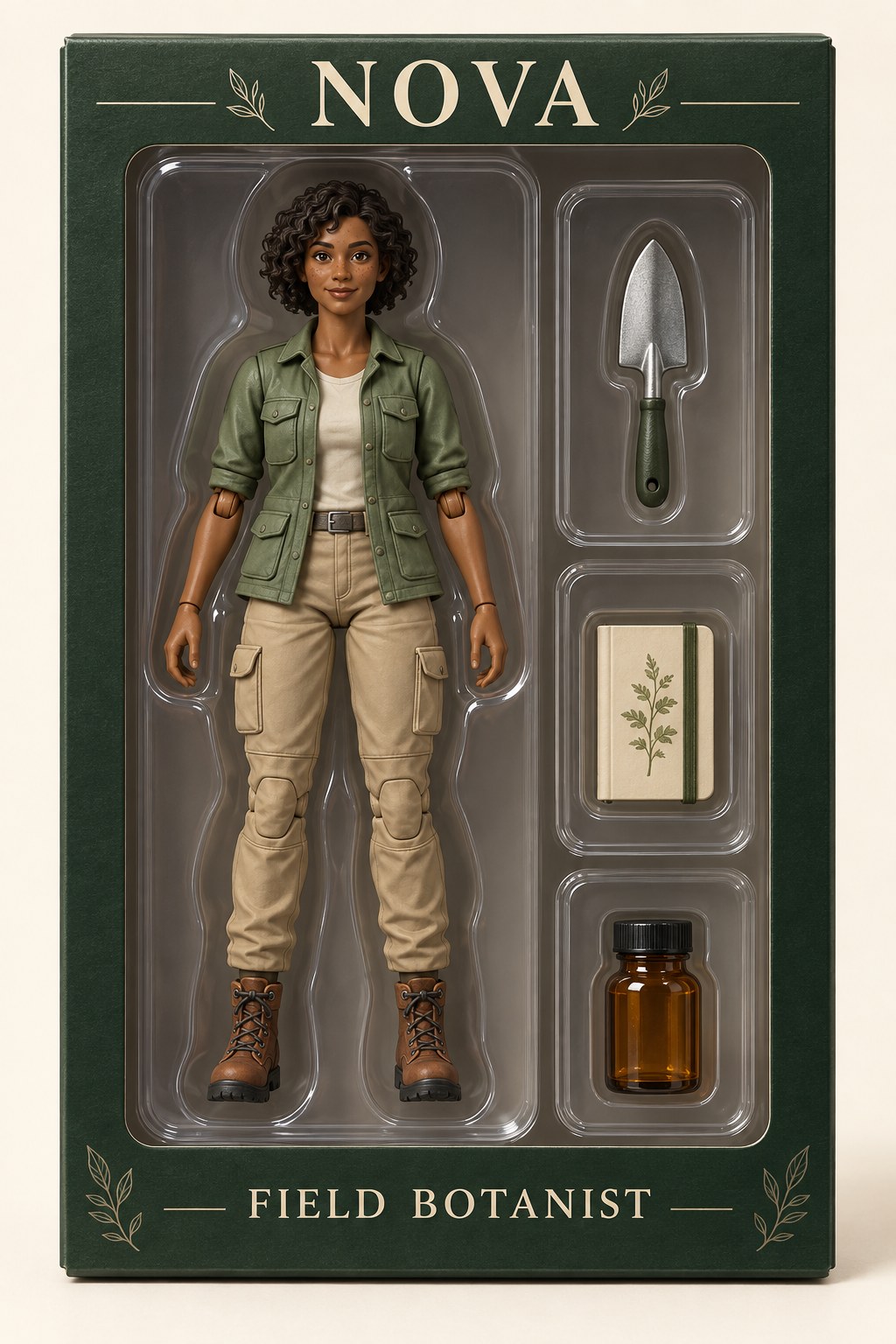
Codex-generated target example, paired with the constructed error image for teaching. It is not the result of an EveryGen AI correction. The character, box, labels, and layout are visually similar across the illustrations, but are not claimed to be pixel-identical.
Compare your revision with your saved candidate at the same display size. Confirm that the lower notebook has been removed, the capped jar is present, and the upper two accessories remain correct. Then repeat the label, figure, compartment, and reflection checks.
Accept the revision only when it fixes the intended problem without introducing another one.
6. Use a different fallback when the error requires it
Not every problem should be handled by repeating the same replacement request.
| Remaining problem | Practical next action |
|---|---|
| The new jar has a separate floating cap or resembles another notebook. | Return to the saved candidate and specify one upright amber container with the cap visibly attached. Recheck the whole inventory afterward. |
| The jar is correct, but NOVA’s face or clothing changes. | Reject that revision and return to the last acceptable candidate. Use external editing when retaining the accepted figure exactly is essential. |
| The accessory slots merge or remain difficult to distinguish. | Request three visibly separated compartments with one item per compartment. If that remains unreliable, arrange the components in an external design document and treat the result as a composed concept. |
| The labels remain misspelled. | Replace them with real editable text in an external editor, removing the incorrect lettering first. Preserve the exact two-label brief. |
| Glare hides the face or an accessory. | Request reduced reflection over the affected area without changing the inventory. Check that the revision has not removed the window or altered neighboring objects. |
| The figure’s boots or box corners are cropped. | Return to a full-package composition with visible margins. Do not hide the problem by cropping the concept more tightly. |
Keep revisions tied to a named baseline. Do not silently adopt a changed character or an extra object just because another part of the image improved.
7. Export a concept with the right description
Download the selected JPEG and reopen the actual file. Check its dimensions, 2:3 proportions, labels, inventory, and framing. If you resize or edit it for a presentation, inspect that final copy again.
The transparent window is a material depicted inside the picture. It means you can see the illustrated figure through the illustrated plastic. It does not make the file a transparent PNG or create alpha transparency around the package.
The PNG illustrations embedded in this article are separate teaching assets; they do not indicate a PNG export option in this JPEG workflow.
Keep the accepted image with the inventory table, exact labels, prompt, settings, and any notes about external edits. A clear sharing description is:
NOVA — original boxed-figure visual concept. One figure and three accessories. Not a manufactured product or production file.
Know what still needs design and engineering
This JPEG is not an STL or OBJ mesh, a rigged model, a printable packaging dieline, or proof that the figure and accessories will physically fit.
For the packaging distinction, Packhelp explains what a packaging dieline actually contains: its workflow separates cut and fold lines from bleed and safe areas. Those are production-layout considerations, not information supplied by a front-facing picture of a box.
A physical version would require separate work on dimensions, modeling, articulation, materials, tray fit, and supplier-specific packaging artwork. The concept can communicate the desired appearance and contents; it does not resolve those engineering decisions.
The image is ready for visual review when another person can identify one NOVA figure, one trowel, one closed notebook, and one capped jar, read both labels, and understand the compartment arrangement without guessing through reflections or cropped edges.