 EveryGen AI
opus 5.5 video guide: Create a Dark Tech Launch Film for Tidy with Animated Windows
Study LemoLab’s fictional Tidy launch film: cursor-led storytelling, animated windows, shared timing, local build steps, and source attribution.
Start here: open EveryGen AI Opus for a dark software-launch story.
Watch Room to Think, LemoLab’s finished Tidy film. Its subject is Tidy, a fictional application: interface clutter overwhelms a cursor, then one decisive action brings order. This is a code-animated launch film, not a screen recording, a real application demonstration, or evidence of EveryGen AI product performance. The author documents a 42-second source project.
The Lemo-Opuscar authorship statement attributes the films to Claude Opus 5.5 writing code. We have not independently verified the author’s model sessions. The entry above is a starting point, not proof of a run or local-terminal access; the commands below require a separate coding environment.
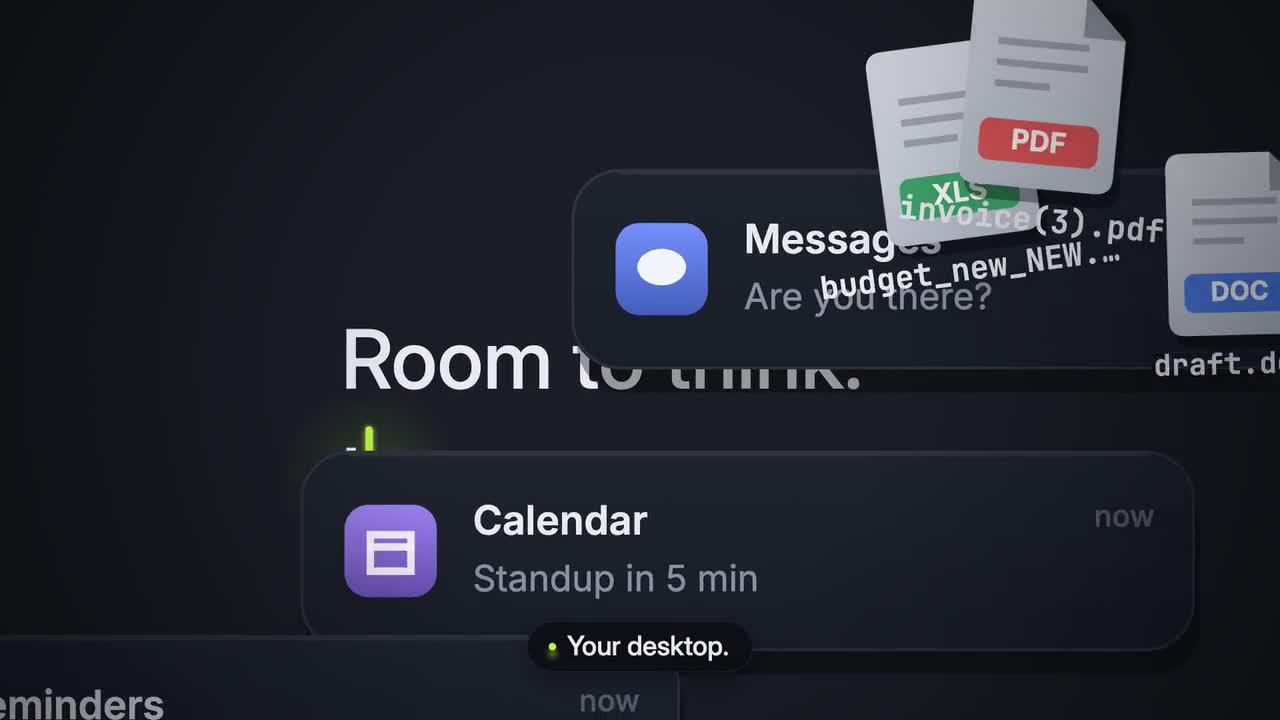
Original frame from Room to Think. Credit: LemoLab. Tidy and its interface are fictional.
1. Read the product story before touching the effects
The Dark Tech Keynote style specification centers the interface on a dark stage, with precise alignment and one dominant accent. The drama comes from disorder becoming order—not from showing a physical product or imitating another company’s desktop.
In the documented Tidy scene breakdown, hundreds of generated interface elements accumulate, the picture freezes, and the cursor initiates their organization. The authored generator contains 264 elements across several categories, not 264 independently verified application windows. Any numerical product claim inside this fictional film remains part of its demonstration narrative, not a benchmark measured here.
Keep the original MP4 untouched. Watch once for the story and again for the cursor, reading holds, and sound. Keep this fictional case distinct from a real SaaS demonstration.
2. Prepare the source and dependencies
Use an isolated workspace with Git, Node 20+, FFmpeg/ffprobe, and Python 3.11–3.13 or uv. The voice tier adds Kokoro and transcription checking. These are reader instructions, not commands run for this article. Reuse a reviewed existing clone rather than overwriting it.
git clone https://github.com/lemomo-ai/lemo-opuscar.git tidy-case
cd tidy-case
export LEMO_OPUSCAR_HOME="$PWD"
sh plugin/skills/lemo-opuscar/scripts/setup.sh deps voice
sh tools/fetch.sh instruments vcsl
mkdir -p evidence
D=styles/dark-keynote/demo
git rev-parse HEAD > evidence/tidy-commit.txt
npm ls --depth=0 > evidence/tidy-dependencies.txt
Retain package-lock.json, Python dependency versions, the original release file, and the demo’s CREDITS. Confirm that the demo source, fonts, voice model, and sample files exist before building. The VCSL fetch command supplies the sample bank used by this score; installation alone does not prove the complete build works.
3. Give the coding agent a reproduction brief
This is a new, copy-ready reproduction prompt, not the author’s original prompt:
Reproduce and study LemoLab's Room to Think from the existing dark-keynote
source. Read the actual commit, lockfiles, STYLE.md, DEMO.md, demo/CREDITS,
core/README.md, and demo/build.sh before changing anything.
Preserve Tidy as a fictional app. Keep the cursor-led clutter-to-order story,
dark stage, original interface elements, shared music/visual cues, and author
credits. Do not insert real-product screenshots, invented benchmarks, or claims
that an actual desktop was sorted. Do not call external media-generation APIs.
Inspect timeline.js, world.js, film.js, the engine, voice lines, score, and mix.
First identify missing dependencies and explain the source's build sequence.
Keep 42 seconds and 24 fps only if the checked-out source agrees. Report any
mismatch with the downloaded release instead of silently changing its timing.
Review the source and assets, then render through the documented script.
Use absolute render(t), stable element identities and destinations, and the
shared note/event tables. Check the cursor press, element flights, grid landing,
reading holds, captions, voice clarity, and the ending. Test reverse seeks.
Record actual model/provider/effort, prompts, code diffs, and real output checks.
Never claim our reproduction passed merely because the author published a film.
Do not publish or present the reconstruction as an original EveryGen AI production.
Use one shared timing source: separate picture and score approximations can disconnect the sorting action.
Another frame extracted from the author’s release. Use the full film, rather than this still alone, to assess motion and timing.
4. Build through the case’s own script
After dependency and rights checks, use the Tidy reproduction script:
sh styles/dark-keynote/demo/build.sh
It exports the note timeline, creates and checks narration, builds the score, exports visual events, checks cues, mixes sound, writes subtitles, renders at 24 fps with two workers, and muxes the final film. It also produces review images. Do not substitute Remotion flags or another style’s renderer.
Regenerated speech still needs listening. Check words, timing, and the intended silence before the decisive action. The script tolerates failure of its final ASR spot-check, so a successful shell completion is not comprehensive acceptance. Read that report and replay the sound yourself.
5. Correct observed problems without changing the case
Save actual review frames:
node core/render/still.mjs "$D" 0 14.9 16.45 26 41.9 \
--out evidence/tidy-stills
These are samples in seconds. Inspect adjacent frames around the press and landing, and check missing fonts or assets.
Correct only the observed flight, alignment, caption, or sound problem. Preserve
Tidy's fictional status and the existing story. Trace destinations and timings
to their shared source; do not hide gaps with a cut. Keep captions outside the
important UI. Show the diff, rerun affected checks, and replay the whole action.
If Chromium fails, inspect Lemo’s browser configuration rather than inventing a new runtime. If sound is missing, resolve the named sample or voice dependency; do not quietly deliver a silent substitute.
6. Verify the MP4 and preserve attribution
ffprobe -v error -count_frames -show_streams -show_format -of json \
styles/dark-keynote/dark-keynote.mp4
ffmpeg -v error -i styles/dark-keynote/dark-keynote.mp4 -f null -
For the unchanged documented source, 42 seconds at 24 fps implies 1,008 picture frames. Verify the actual dimensions, rate, audio, and ending; do not assume a web-compressed release and local render are byte-identical. Watch the complete export, including the quiet moments and credits.
Author-film reference frame. Keep its source attribution separate from any locally reproduced review output.
Archive the editable project, source commit, dependencies, prompts, human changes, and reviewed MP4. Lemo’s code is MIT; this case’s fonts retain OFL notices, VCSL samples are credited as CC0, and the voice components have separate licenses. Preserve the Tidy asset-credit record, rather than treating the whole film as an uncredited template.